In short
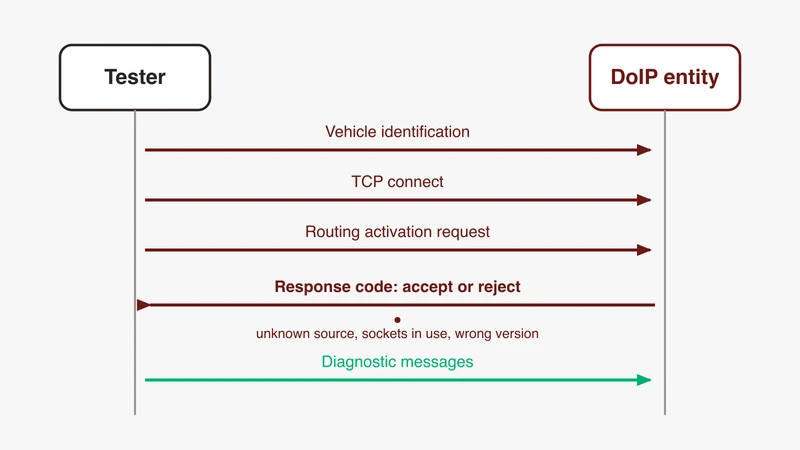
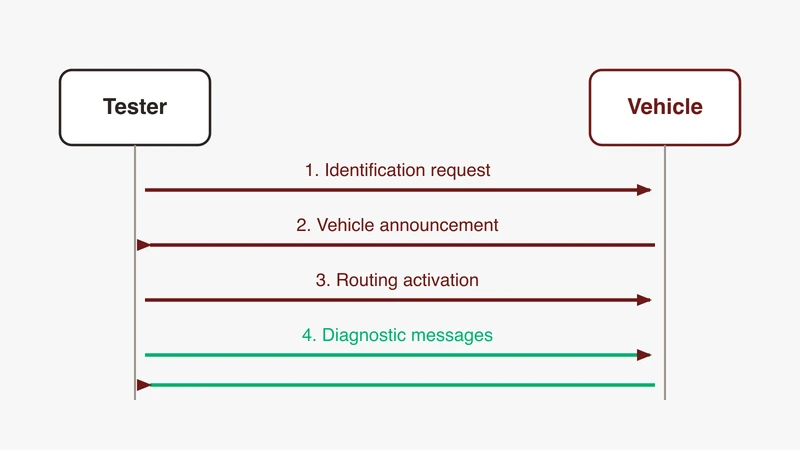
DoIP, Diagnostics over IP, is the transport defined by ISO 13400 that carries UDS diagnostic messages over automotive Ethernet. It is not a diagnostic service layer itself. A session runs in three phases: vehicle discovery over UDP, routing activation over TCP, and then diagnostic messages, all on port 13400 by default.
Most explanations of DoIP stop at the acronym. The part that costs an engineer a day is the moment when discovery works perfectly, the vehicle answers with its VIN and logical address, the TCP socket opens without complaint, and every diagnostic request you send disappears into silence.
This article walks a session end to end, in the order the bytes appear. Every structural detail comes from public sources, mainly the open-source python-doipclient library and the Wireshark DoIP dissector. ISO 13400 itself is paid, so we name it and do not reproduce it.
What DoIP is, and what it is not
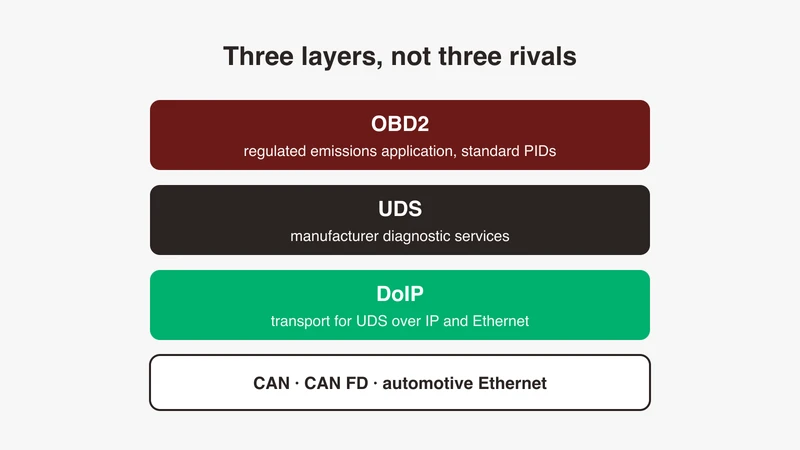
DoIP is a transport. It carries diagnostic messages over an IP network, which in a vehicle means automotive Ethernet. It is not a diagnostic service layer, and it does not define what a diagnostic request means.
The services come from UDS, standardised as ISO 14229. A read request, a session change, a security access exchange: those are UDS, and they look the same over a classic bus or over an IP link. For the service layer, start with our UDS explainer and the service ID reference.
Three things DoIP is not. It is not a replacement for UDS; it carries UDS. It is not OBD2 over Ethernet, since legislated emissions diagnostics and manufacturer diagnostics are different scopes, separated in OBD2 vs DoIP vs UDS. And it is not “UDS with an IP header”: DoIP adds discovery, an admission handshake and its own acknowledgements, each a place where a session fails before any diagnostic byte moves.
Why diagnostics moved onto an IP link
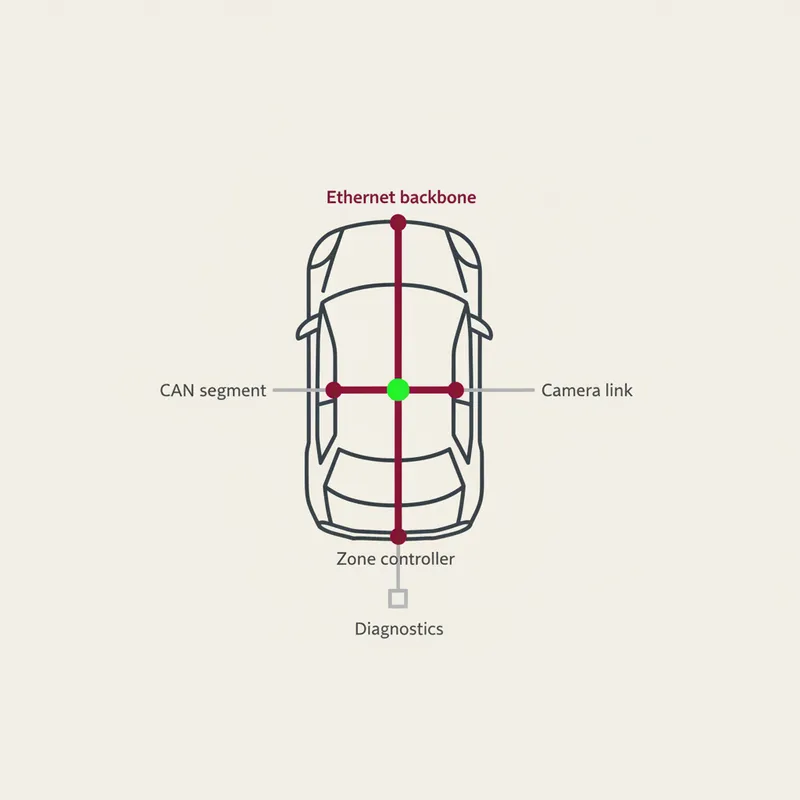
The reason is volume. Diagnostic sessions that once read a handful of identifiers now move calibration data, log extracts and software images, and the classic in-vehicle buses were never designed as bulk transfer paths. Once a vehicle already carries an Ethernet backbone, running the diagnostic entry point over the same physical layer removes a bottleneck without adding a network. Our automotive Ethernet guide covers the physical layer, and our note on how Ethernet sits in the vehicle communication architecture covers where the link lands relative to everything else.
One boundary: the manufacturing-line use of an Ethernet ECU link is a different subject with different constraints, covered separately in our note on the XDM-ETH production reflash tooling, and nothing here addresses it.
The ISO 13400 parts, from public sources
Knowing which part owns what saves looking in the wrong document. The ISO catalogue lists them by name: Part 1, general information and use case definition; Part 2, transport protocol and network layer services; Part 3, wired vehicle interface based on IEEE 802.3; Part 4, Ethernet-based high-speed data link connector.
The catalogue abstract for Part 2 describes it as specifying requirements for secured and unsecured diagnostic communication between a client DoIP entity and servers installed in the vehicle, using IP with TCP and UDP. That is where every message in this article belongs. Part 3’s abstract describes a vehicle interface with a physical and data link layer based on IEEE 802.3 100BASE-TX, and Part 4’s a diagnostic connection of two mating connectors, one on the vehicle and one on the external test equipment. The standard is paid, so nothing here quotes a clause from it: the part names and scopes come from the public catalogue listing, and everything structural from open-source implementations and the Wireshark dissector.
Version numbering in the header, and why an older tool will not decode
The protocol version byte tracks the edition, not the part. The Wireshark dissector recognises ISO13400_2010 (0x01), ISO13400_2012 (0x02), ISO13400_2019 (0x03) and ISO13400_2019_AMD1 (0x04), the last labelled experimental in its source. A thread on ask.wireshark.org, question 28259, records how that grew: Wireshark 3.6 and later support DoIP up to ISO 13400-2:2019, version 3 in the header field, and version 4 support was merged later, available from development builds numbered 4.1.0rc0-118 or newer.
So if a capture will not decode, check the tool version against the header version before you suspect the vehicle. Mismatches cut both ways at the tester too: python-doipclient defaults protocol_version to 0x02 while documenting that its implementation targets 0x03, so a gateway expecting the newer version may reject a client that never announced it.
The physical layer: DoIP cable, activation line, and the connector
A plain patch cable from a laptop into a vehicle’s diagnostic connector is often not sufficient, and the public record explains why in two places.
The first is the connector. Part 4 covers the diagnostic connection as a pair of mating connectors, Part 3 the vehicle-side interface as 100BASE-TX. A cable whose vehicle end lands on the wrong pins is not presenting the pair the interface expects, whatever the RJ45 end looks like. Which pins those are is set per vehicle programme, so treat the OEM’s diagnostic specification as the authority and any forum pinout as a hypothesis to verify.
The second is the activation line, which most first-time users have never heard of. An interface facing an external tester need not be up all the time. AUTOSAR’s Classic Platform specification of Diagnostic over IP models this directly: a DoIP interface can be activation-line controlled, and when the activation line status switches to active, the module establishes the connections for that interface. Internal interfaces are treated as though the line were permanently high; externally facing ones are not. Until the line is asserted there is nothing listening, and the symptom is not an error message but an interface that never comes up, which looks identical to a dead cable.
So “the cable does not work” is usually the wrong diagnosis: either the pins are wrong, or the gateway has not brought the interface up. A lab bench sidesteps both by connecting directly to the ECU’s Ethernet interface, which is why most first sessions are run that way.
The three phases of a session
| Phase | Transport | What it establishes |
|---|---|---|
| Vehicle discovery | UDP, port 13400 | The vehicle’s IP address, VIN, and logical address |
| Routing activation | TCP, port 13400 | Admission of your tester socket by the gateway |
| Diagnostic messages | TCP, same socket | UDS request and response payloads |
Every DoIP message carries the same eight-byte header. python-doipclient packs it as !BBHL: protocol version, the bitwise inverse of that version, two bytes of payload type, four bytes of payload length. The inverse-version byte is a cheap sanity check, and the first thing to look at when a receiver rejects a message it should have understood.
Phase one, vehicle discovery
Discovery is a UDP exchange. The tester sends a vehicle identification request and the vehicle answers with a vehicle identification response. The vehicle also sends the same message unprompted at power-on, where it is a vehicle announcement; python-doipclient documents both paths, request_vehicle_identification() and await_vehicle_announcement().
The library defines three request forms: plain (payload type 0x0001), qualified by EID (0x0002), and qualified by VIN (0x0003). All three are answered by one response type, 0x0004. get_entity() defaults its target address to 255.255.255.255, so a tester with no prior knowledge can broadcast and see who answers.
The response carries six fields, named in the library as vin, logical_address, eid, gid, further_action_required and vin_sync_status. The library accepts both !17sH6s6sBB and !17sH6s6sB, because the trailing VIN/GID sync status byte is optional, so a 32-byte payload is legal and not a truncated message:
| Field | Size | What it is for |
|---|---|---|
| VIN | 17 bytes | Vehicle identification number, ASCII |
| Logical address | 2 bytes | The address you target in later messages |
| EID | 6 bytes | Entity identification, unique per entity |
| GID | 6 bytes | Group identification, shared within a vehicle |
| Further action required | 1 byte | Whether extra steps precede routing |
| VIN/GID sync status | 1 byte | Whether VIN and GID agree across entities |
Two of those decide what happens next. The logical address is the target for every diagnostic message, and taking it from discovery rather than a spreadsheet removes a class of bench errors. The further-action byte matters as much: the library names its two defined values NoFurtherActionRequired (0x00) and RoutingActivationRequired (0x10), the latter documented as routing activation being required to initiate central security. A vehicle returning 0x10 is warning you that a plain default activation will not be enough.
Timing matters. A_DOIP_ANNOUNCE_NUM is 3 and A_DOIP_ANNOUNCE_INTERVAL is 0.5 seconds, so an entity announces itself three times at half-second spacing when it comes up, and A_DOIP_CTRL is 2 seconds, the window get_entity() waits. If your capture starts after power-up you missed the announcements and need the solicited request.
The failure mode worth naming is the one that looks like success. Discovery is stateless and unauthenticated, so it works when nothing else will. An engineer sees the VIN come back, concludes the link is good, then spends hours debugging a layer never reached.
Phase two, routing activation
Routing activation asks the gateway to admit your socket. Opening the TCP connection is not enough: the socket will connect, stay open, and route nothing.
The request is payload type 0x0005, with fields source_address, activation_type, a four-byte reserved field and an optional four-byte vm_specific field, packed as !HBL or !HBLL. The source address is your tester’s, not the vehicle’s. The default client_logical_address is 0x0E00, and the documentation gives the tester range as 0x0E00 to 0x0FFF, distinct from the 0x0001 to 0x0DFF range it gives for ECU addresses. The activation types defined are Default (0x00), DiagnosticRequiredByRegulation (0x01) and CentralSecurity (0xE1 in this library; AUTOSAR R24-11, the Wireshark dissector and Scapy all put central security at 0xE0, so take the value from your OEM specification); Default is the right first attempt in almost every case.
The response is payload type 0x0006, carrying the tester address back, the entity’s own logical address, and a response code, named in the library as:
| Code | Name in the library | What it means on a bench |
|---|---|---|
| 0x00 | DeniedUnknownSourceAddress | Tester address not recognised |
| 0x01 | DeniedAllSocketsRegisteredActive | Tester sockets all in use |
| 0x02 | DeniedSADoesNotMatch | Source address differs from the one bound to this socket |
| 0x03 | DeniedSARegistered | That source address is active on another socket |
| 0x04 | DeniedMissingAuthentication | Authentication required, not done |
| 0x05 | DeniedRejectedConfirmation | A confirmation step was rejected |
| 0x06 | DeniedUnsupportedActivationType | Activation type not supported |
| 0x07 | DeniedRequiresTLS | The entity wants the secured connection |
| 0x10 | Success | Routing is active |
| 0x11 | SuccessConfirmationRequired | Not active yet, a confirmation step is outstanding |
The source address whitelist, which is the gotcha
Read 0x00, 0x02 and 0x03 together and the practical rule falls out: gateways do not accept arbitrary tester addresses. Many accept one value, or a small set, configured per vehicle programme. A tester that picks a plausible-looking address gets refused, and the refusal is a single byte that most tool stacks surface as a generic error rather than the specific code.
The generic-error problem is visible in a thread on the NI automotive and embedded networks forum. An engineer with a working discovery, correct IP address and VIN retrieved, hit an undefined error -8305 after activating routing. Support explained the code means the routing activation response received from the ECU is not correct, and suggested checking the protocol version and the source and target addresses, with a Wireshark capture as the tie-breaker. The closing note is the useful part: the trace was extremely helpful, and the root cause was a bug in the ECU.
Two implementation details make refusals easy to miss. First, do not read the TCP socket state as the verdict: AUTOSAR closes the socket after most denials but explicitly leaves it registered after 0x04, so a connection check tells you nothing on its own. Second, python-doipclient raises ConnectionRefusedError if the activation it performs at construction time returns anything other than Success, including SuccessConfirmationRequired. The code is interpolated into the exception message but not exposed as a structured field, so read result.response_code when you drive activation yourself.
Timers apply too: T_TCP_INITIAL_INACTIVITY is 2 seconds and T_TCP_GENERAL_INACTIVITY is 300 seconds, so a socket left idle without activation is dropped quickly.
Phase three, UDS inside a diagnostic message
Once routing is active the socket carries diagnostic messages. Payload type 0x8001 has three fields: a source address, a target address, and user data that is the UDS request, unchanged.
Take a ReadDataByIdentifier request for identifier 0xF190, 22 F1 90 on any transport. From a tester at 0x0E00 to an ECU at 0x0201, with protocol version 0x02, the frame is:
02 FD 80 01 00 00 00 07 0E 00 02 01 22 F1 90
|  |  |     |           |     |     |
|  |  |     |           |     |     UDS request: 0x22, DID 0xF190
|  |  |     |           |     Target address 0x0201
|  |  |     |           Source address 0x0E00
|  |  |     Payload length 0x00000007
|  |  Payload type 0x8001, diagnostic message
|  Inverse version 0xFD
Protocol version 0x02
The payload length is 7: two address bytes, two more, and three bytes of UDS. Nothing about the UDS request changed, which is the whole point of a transport.
DoIP adds its own acknowledgements, separate from anything UDS does. Payload type 0x8002 is the positive acknowledgement, carrying an ack code and optionally echoing the previous message. Payload type 0x8003 is the negative one, and python-doipclient names its codes InvalidSourceAddress (0x02), UnknownTargetAddress (0x03), DiagnosticMessageTooLarge (0x04), OutOfMemory (0x05), TargetUnreachable (0x06), UnknownNetwork (0x07) and TransportProtocolError (0x08).
Keep those distinct from UDS negative response codes. A 0x8003 message means the transport refused to carry your request. A UDS negative response arrives as a normal diagnostic message whose payload starts with 0x7F, meaning the ECU understood you and declined; those are catalogued in our NRC table. Debugging the wrong layer wastes real bench time in a first bring-up.
A third refusal path sits above both: payload type 0x0000, the generic header negative acknowledgement, with codes IncorrectPatternFormat, UnknownPayloadType, MessageTooLarge, OutOfMemory and InvalidPayloadLength. Seeing one means the receiver rejected your header before looking at anything else.
Long sequences bring in the alive check, payload types 0x0007 and 0x0008, with T_TCP_ALIVE_CHECK at 0.5 seconds. An entity may ask whether your socket is still wanted, and a client that does not answer promptly can find it reclaimed mid-sequence.
Gateways, addressing, and where the entry point sits
DoIP addressing is logical, not topological. The two-byte addresses in the header have nothing to do with IP addresses. A tester address identifies the client, an ECU address a target, and the gateway maps between those and whatever sits behind it, including nodes on non-Ethernet buses.
Physical addressing means one target; functional addressing means one request intended for several nodes at once, and it catches tooling out. A Scapy issue filed in October 2024, since fixed, describes it precisely: with functional addressing, the source addresses of the ECU responses differ from the target address of the preceding request, because each ECU answers from its own address. Scapy’s response matching filtered those replies out as mismatched and returned no answers. The lesson generalises: if your stack matches responses strictly on address, functional addressing looks like silence even when the ECUs replied.
Where the entry point sits is an architecture decision, and DoIP tells you which kind of node you reached. python-doipclient’s entity status request returns a node_type field whose defined values are 0x00 for a DoIP gateway and 0x01 for a DoIP node, alongside max_concurrent_sockets, currently_open_sockets and max_data_size. A vehicle that terminates every tester connection at one central gateway answers 0x00 from a single address, and everything else sits behind that node. A vehicle that spreads the function across controllers, each with its own entity, answers 0x01 from addresses reachable in their own right. Ask before assuming a topology, and read max_concurrent_sockets too, because it decides whether a second tester on the bench is admitted. Reaching diagnostics over an IP path from outside the vehicle is a related problem, worked through in our telematics unit deep dive.
Seeing it on the wire
The port facts are public. The IANA service name and transport protocol port number registry lists doip-disc on 13400 UDP for DoIP Discovery and doip-data on 13400 TCP for DoIP Data. python-doipclient defines UDP_DISCOVERY and TCP_DATA_UNSECURED as 13400 and TCP_DATA_SECURED as 3496, and the Wireshark dissector defines DOIP_PORT 13400 and DOIP_TLS_PORT 3496. Discovery goes out from a dynamically assigned source port, so do not filter on 13400 as a source port.
Wireshark dissects DoIP natively, and the field names in packet-doip.c are the ones to filter on.
| Filter | Shows |
|---|---|
doip | Everything recognised as DoIP |
doip.type == 0x0004 | Identification responses and announcements |
doip.type == 0x0006 | Routing activation responses |
doip.response_code | The activation response code |
doip.source_address, doip.target_address | Logical addressing |
uds.sid | The UDS service byte inside |
uds.rdbi.data_identifier | The identifier in a read request |
For scripted work the same library gives you a starting point: construct a DoIPClient with the ECU IP address and logical address, let it activate at construction, then hand it to udsoncan through the provided connector, so your UDS layer is a real client rather than hand-packed bytes. Capture while you do it, so the first successful session is also your reference trace.
If the vehicle carries service-oriented traffic as well, SOME/IP is the protocol you are most likely to see beside DoIP in the same capture.
Security on a DoIP link
Nothing in the three phases above authenticates anybody. Discovery answers whoever asks. Routing activation checks a source address against a configured list, which is a filter, not a credential. The diagnostic message layer carries whatever UDS handed it, and any authentication there is UDS through security access.
That is not an inference. The open-access paper “Analysis of the DoIP Protocol for Security Vulnerabilities”, by Patrick Wachter and Stephan Kleber, analyses the protocol deductively and confirms the conclusions formally with the Tamarin prover. Its stated result is that DoIP cannot be considered secure, mainly because the security mechanisms TLS and client authentication are not mandatory in it. The paper proposes measures for vulnerabilities it confirms remain after TLS is activated, and states those measures require only a minor redesign of the protocol.
Two things follow on a bench. The secured path is separate: 3496 is the TLS port in both python-doipclient and the Wireshark dissector, and DeniedRequiresTLS (0x07) is how an entity says it will not talk on the unsecured one, so 0x07 is not fixed by a different source address. And treat a DoIP-capable diagnostic interface as exposed: whatever protection a programme relies on, the DoIP layer is not supplying it.
Where GSAS fits
A first DoIP session against a real gateway is rarely a protocol problem on paper, and usually a bench problem: which interface to connect to, whether the activation line is asserted, which tester address the gateway admits, which layer the silence is coming from, and whether the capture decodes at all. Those are answerable in an afternoon with the right trace and someone who has seen the failure modes before.
GSAS Micro Systems works as an engineering partner to diagnostics, HIL and validation teams in India, with support in IST hours and consultation on bench and tooling decisions. If you are planning a DoIP-capable bench, or working through a session that stops after discovery, see our automotive Ethernet capabilities or request a consultation.
References
- python-doipclient documentation and source, for message structure, payload types, response codes and timing constants: github.com/jacobschaer/python-doipclient and python-doipclient.readthedocs.io
- udsoncan documentation, for the UDS client carried over the transport: udsoncan.readthedocs.io
- Wireshark DoIP dissector source, for field names and recognised header versions: packet-doip.c
- IANA service name and transport protocol port number registry, for the doip-disc and doip-data registrations on port 13400: iana.org
- ISO catalogue listings for ISO 13400 Parts 1 to 4, for part titles and published scopes: iso.org
- AUTOSAR Classic Platform, Specification of Diagnostic over IP, for the activation-line controlled interface behaviour: autosar.org
- Patrick Wachter and Stephan Kleber, “Analysis of the DoIP Protocol for Security Vulnerabilities”: arxiv.org/abs/2211.12177
- ask.wireshark.org question 28259, on DoIP header version support across Wireshark releases
- NI automotive and embedded networks forum, thread on DoIP undefined error -8305 during routing activation
- Scapy issue 4547, on functional addressing responses arriving from physical source addresses
Also appears in:
Building for Automotive & Mobility?
Talk to our application engineers for personalized tool recommendations.