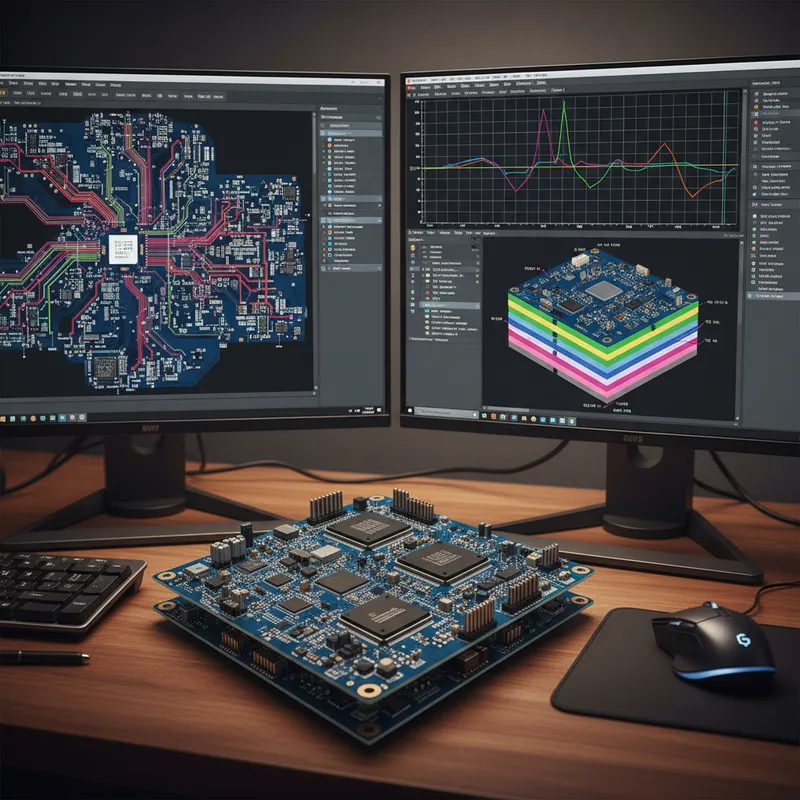
The Xpedition 2604 release lands at a moment when PCB design teams in India are being asked to do more with the same headcount: more interfaces per board, more variants per product, more verification, and tighter alignment with manufacturing partners that increasingly sit thousands of kilometres from the design seat.
Siemens has used this cycle to attack friction across the full Xpedition flow rather than ship a single tentpole feature. The result is twelve distinct improvements that each compound over a typical project, from a natural-language AI assistant baked into the UI, to creepage checking during layout, to web-based check-in/out, to native IPC-4761 via support that finally lets Valor NPI consume the design’s manufacturing intent without a translation step.
This post walks through every one, with the official Siemens demo video embedded against each section and the workflow details captured from the demos themselves.
An AI assistant inside the Xpedition window
Onboarding pain is the unspoken cost of any EDA tool. New engineers and interns spend their first weeks hunting through PDFs and KB articles for the right menu path. Xpedition 2604 puts an AI assistant directly inside the product UI, trained only on the documentation and knowledge base for the exact product and version you have open, so the answers are scoped instead of generic.
In the Siemens demo, the assistant walks a designer through a stackup configuration end to end: defining layers, assigning materials, calculating dielectric constants, the lot. The same panel handles scripting, design rule setup, routing strategies, 3D visualisation, constraint management and variant design, anywhere the question “how do I do this here?” used to send you to a manual.
For Indian teams running mixed-experience benches, senior PCB leads in Bengaluru alongside fresh hires in Pune and Hyderabad: this is the kind of feature that quietly shortens ramp time from weeks to days.
Multi-board interface signal matching that stops fighting your naming conventions
Anyone who has integrated a system from multiple board teams knows the pattern: the schematic capture flags “connectivity errors” that turn out to be naming-convention mismatches. One team calls a power net VCC_3V3, the other calls it P3V3, the integration tool flags both, the designer spends half a day chasing ghosts.
Xpedition System Designer’s new Signal Dictionary lets you stop chasing them. You classify nets into allow and ban lists inside a single dictionary. Allow-list entries tell the tool “these names are equivalent, never flag them.” Ban-list entries tell it “these must never be considered equal, ever.” Lists can be global (applied to every mated connector pair in the project) or local (scoped to one connector pair only), so general conventions sit at the project level while connector-specific exceptions stay local.
The dictionaries are importable and exportable, which matters in practice, a corporate naming standard can be authored once and shared across every project in the organisation, instead of being copied by hand into each new design. The net effect is fewer false positives and faster discovery of the real interface errors hiding in a complex multi-board system.
Creating documents directly in the navigator panel
Tiny workflow frictions become invisible until you remove them. In 2604, the navigator panel in Xpedition Designer can now create the core document types, schematics, sheets and boards, directly inside the panel, instead of bouncing through menus or dialogs.
Two things follow from that. First, you can build the design hierarchy as you think about it, without context-switching out of the structural view. Second, Siemens has fixed the sheet-ordering inconsistencies that occasionally produced surprises in the printed output. The new structure is predictable in the way the old one quietly wasn’t.
Library Manager: modern search, wildcards, and a smarter Footprint Expert
Xpedition Library Manager picks up a redesigned search bar at the top of the Library Navigator tree. It indexes both traditional library objects and the newer 3D models, plus objects that reference other objects, so when you search for a part, the result set understands the relationships, not just the names.
Wildcards (* and ?) now work at any position in the search string, so a partial recollection of a part number actually finds something. The Footprint Expert has been updated alongside the search: additional SOT package family options, a new bar-style polarity marker for two-pin components, plus a backlog of fixes and calculator improvements.
Part Builder gets the larger-symbol treatment that FPGA, connector and microprocessor work has been waiting for. You can create fractured symbols with a consistent appearance, export pin data to CSV for bulk edits in a spreadsheet, then reimport to regenerate the symbol, useful when the pin list comes from a vendor datasheet, PartQuest, or HyperLynx Schematic Analysis instead of being typed by hand.
EDM supply chain meets PartQuest, plus an Intelligent Part List
Two related changes here, and together they shift how part selection works at the start of a design and how supply-chain risk gets reviewed near the end of one.
First, EDM Collaborate can now extend its search into PartQuest Portal. You search your corporate library, find that the active manufacturer-part coverage is thin, and instead of opening a separate tab you extend the same search criteria directly into PartQuest. EDM maps the search across, returns thousands of candidate parts, attaches Supplyframe-sourced supply chain data and ECAD models to each, and lets you drag a chosen part back into your EDM Collaborate window. Depending on your permissions, that drag either kicks off a new-part request or creates the manufacturer-part object outright, auto-classified into the right catalog with metadata already populated.
Second, the new Intelligent Part List analysis turns the design’s saved part list into a board-level supply chain review. You can run the analysis at any variant configuration, sort by lifecycle status or risk, see stock and price columns per supplier, and refresh the analysis whenever you want a current snapshot. Total board cost is computed alongside the per-part view, so a programme manager in Chennai or a buyer in Mumbai can answer “what does this BOM cost today, and what changed since last week?” without exporting to Excel.
Collaboration notes: conditional formatting on any property, linkable IDs
Collaboration notes inside EDM have been a useful idea hampered by a clumsy reading experience. Two fixes in 2604 change that materially.
The first is conditional formatting beyond the check column. You can now pick any property visible in the current view and create a rule against it via the Conditional Formatting button on the menu strip. A reviewer can highlight every note above a certain severity, or scoped to a particular subsystem, without manually scanning.
The second is the new collaboration note ID parameter, which makes notes addressable. External links can now point at a specific note instead of a generic page, and EDM notifications about newly published notes carry that deep link in the body. From the Notification Center you can click straight through to the ID parameter of the note in the Collaborate viewer. From the note panel a Share Link button copies a URL you can paste into a ticket, email or chat. Reviews stop being a hunt-and-peck exercise.
Web-based check-in and check-out from EDM Collaborate
The browser-based EDM Collaborate view picks up genuine design workflow in 2604. From the board information panel, you select a board, click Check Out in the menu bar above it, and choose either Xpedition Layout or FabLink as the target tool. The EDM web launcher hands the session to the local application, a pop-up appears, you click Open, and you are editing as if you had started from the desktop client.
When the work is done you save, close the application, return to the browser, select the newest version, and check in from the same menu bar. The point is not that web-based check-in is new conceptually, it’s that the web client now covers enough of the end-to-end flow that an engineer working away from their main workstation, in another office or from home, doesn’t need to install the full EDM desktop just to participate.
Component Explorer: expand/collapse, and it remembers where you were
A small but daily quality-of-life change. The Component Explorer now has explicit Expand All and Collapse All controls built into the tree, so you don’t have to click through nested nodes one at a time to see the whole hierarchy or tidy it back down.
More usefully, the tree remembers your expansion state between sessions. Close Xpedition with a particular subset of components open and you’ll return to the same view next time, instead of restarting from a fully collapsed root and rebuilding context every morning.
Creepage distance checking, inside the layout editor
Creepage, the shortest path along a non-conductive surface between two conductors, is the spacing constraint that prevents arcing on high-voltage boards. Historically it has been checked late, either via a manufacturing review or an after-the-fact EMC/safety audit. Xpedition 2604 brings an initial creepage validation directly into the layout editor.
The checker handles both online mode (net-to-net, with dynamic updates and pinpointed locations as you edit) and batch mode (net class to net class, with the same violation reporting plus the minimum clearance requirement). It understands cutouts. A through cutout with critical signals on either side is measured around the contour until the requirement is satisfied. A blind cutout is measured along the external surface and down to the blind floor. Signals on top and bottom surfaces around a contour are measured through the wall of the contour to each external layer.
For Indian teams designing motor drives, power supplies, EV inverters and medical front-ends in Bengaluru, Pune and Chennai, that means a creepage failure is something you can see while you route, not three days before tape-out when there’s no room left to move anything.
BluePrint-PCB launches directly from Xpedition
For teams using BluePrint-PCB as their assembly-documentation tool, the 2604 integration removes the export step. You launch BluePrint-PCB straight from the Xpedition Layout interface, no exporting files, no chasing through folders for the right revision. BluePrint’s intelligent templates auto-populate the drawings with current design data: component placement, layer information, the lot.
The relaunch story is the real payoff. Remove a connector from the board in Xpedition, relaunch BluePrint, and you get notified of the pending changes across the project, every drawing and table that referenced that connector updates against the new revision. Manufacturing documentation stays in sync with the latest design without manual edits, which is exactly the failure mode that triggers expensive re-spins when an outdated drawing reaches an EMS partner.
Native IPC-4761 via type support for Valor NPI
IPC-4761 defines the standard via protection and tenting types, capped, plugged, filled, tented and the rest. Until 2604 these types had to be communicated to Valor NPI through additional metadata or naming conventions. Xpedition 2604 supports IPC-4761 via type definition natively inside the pad stack editor, which means Valor NPI can fully consume those types as part of its DFM analysis without a translation step.
The downstream effect is a cleaner manufacturing digital twin: the design’s intent for every via, expressed in the language the manufacturing tooling already understands, with no ambiguity at the design-to-manufacturing hand-off.
DFM checking during concurrent team layout
Concurrent team layout, multiple designers editing different regions of the same board at the same time, used to mean you couldn’t run DFM mid-session, because the analysis tool wanted the whole design and your colleagues were holding parts of it.
In 2604, Xpedition DFM runs inside team layout, scoped to a protected area. You define the protected area in the team session, which already prevents other users from interfering with that region, and that same boundary becomes the scope for the DFM run. Launch Xpedition DFM, pick from the pre-configured Valor NPI DFM profiles your DFM expert has authored, run the analysis, review the results in Hazard Explorer, and fix the issues without leaving the concurrent session.
This is the change that lets DFM stop being a serial gate at the end of layout and start being a continuous activity alongside it.
Why this matters for Indian engineering teams
India’s PCB design population is concentrated in a handful of corridors and each one stresses Xpedition in a slightly different direction.
- Bengaluru: automotive, defence and semiconductor design houses that integrate multi-board systems and live or die by the quality of interface verification. The Signal Dictionary work and the DFM-during-team-layout change will land hardest here.
- Hyderabad: aerospace, defence and semiconductor SoC validation boards where library hygiene, IPC-4761 via discipline and supply-chain-aware part selection determine how cleanly a design hands off to an EMS.
- Chennai: automotive Tier-1s and industrial automation teams designing ECU and motor-drive boards; creepage in the layout editor is the headline feature for high-voltage product lines.
- Pune: automotive R&D centres and industrial IoT teams that run mixed-experience benches; the AI assistant compounds across every new hire.
- Mumbai: telecom infrastructure and industrial electronics teams that operate distributed review cycles; web-based check-in/out and addressable collaboration notes change how reviews actually happen.
- Delhi NCR: telecom, defence and semiconductor programmes that depend on synchronised documentation across multiple sites; BluePrint integration removes the manual sync step.
For procurement, the relevant change is not technical: it’s that Xpedition Standard and Xpedition Enterprise are both available in India through GSAS Micro Systems as an authorised engineering partner, with local pricing, MSME paperwork and on-call application engineering attached to every seat.
Frequently asked questions
Is the Xpedition 2604 AI assistant a cloud LLM call, or does the model run locally?
Siemens has not published deployment details in the release blog. What is publicly stated is that the model is trained on product documentation and KB articles for the specific product and version you have open, and that responses are scoped to that surface. Procurement and IT teams reviewing the feature should ask Siemens directly about data residency and transport before rolling it out on programmes with data-handling restrictions.
Does the Signal Dictionary replace the existing signal manager in Xpedition System Designer?
No. The Signal Dictionary is described as an extension of the signal manager, it adds the allow/ban-list classification on top of the existing signal management flow, rather than replacing it.
Can I check designs in and out from a browser without installing the EDM desktop client?
Yes, the EDM Collaborate web client now covers check-in and check-out, launching the local Xpedition Layout or FabLink session via the EDM web launcher. You still need the authoring tool installed locally. What you don’t need is the full EDM desktop alongside it.
Does the creepage checker replace a formal high-voltage safety review?
No. It’s an early validation inside the layout editor, designed to catch creepage issues during routing rather than at tape-out. Formal compliance against IEC 60664-1, IPC-2221 or product-specific safety standards still happens through your normal review and certification process.
Does Xpedition 2604 support IPC-4761 via types natively?
Yes, the pad stack editor now defines IPC-4761 via types natively, and Valor NPI consumes them directly in its DFM analysis. There is no translation step required at the design-to-manufacturing hand-off for those via attributes.
Can multiple designers run DFM on the same board at the same time during a team layout session?
Yes, Xpedition DFM now supports team layout. Each user runs DFM scoped to their own protected area of the board, so analysis happens concurrently without interfering with other users’ regions.
Where GSAS comes in
GSAS Micro Systems is an authorised Siemens EDA engineering partner in India for Xpedition, with application engineers in Bengaluru, Hyderabad and Pune who support migration from competing tools, install Xpedition Standard and Enterprise on local benches, configure library and EDM environments, and help teams adopt the new 2604 capabilities on real designs.
If you want to evaluate 2604 against your current flow, the 30-day Xpedition Standard trial is the fastest way in:
- Start a 30-day Xpedition Standard trial
- Talk to the GSAS Siemens EDA team
- See the full Siemens EDA portfolio we support
Further reading
- Xpedition Standard for Indian PCB design teams, a deep dive, what’s in the box, where it fits, what it costs.
- Migrating to Xpedition from PADS, Altium or OrCAD, the practical playbook for moving libraries, projects and team habits.
- ECAD-MCAD collaboration in Xpedition for Indian product teams, how the same data spine reaches NX and Solid Edge without an export step.
Also appears in:
Interested in Siemens EDA tools?
Talk to our application engineers for personalized tool recommendations.
More from Siemens EDA
View all →
India's EDA Moment: Why Design Tool Demand Is Growing, and the Engineering Careers It Creates
21 Sept · 9 min
AI and Complexity Are Redrawing EDA: Siemens on the Trillion-Transistor Era
13 Sept · 6 min
Calibre Vision AI: Bringing Order to DRC Debug at Advanced Nodes
24 Aug · 4 min
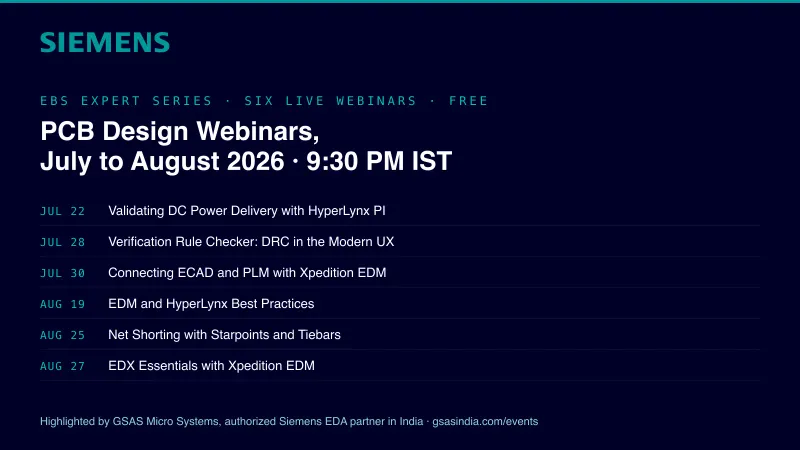
Siemens EDA EBS Expert Series: 6 Free PCB Design Webinars (Jul-Aug 2026)
20 Jul · 8 min

Emulating Processor Power for Thermal Testing: Why Constant Power
7 Oct · 7 min

CRPS and Rack Power Supply Testing: The Six Tests That Matter
7 Oct · 7 min