Indian PCB design teams evaluating professional tools in 2026 almost always land on the same shortlist: Altium Designer on one side, and a Siemens EDA option on the other. If you’re comparing Altium Designer vs Siemens Xpedition Standard for your next program, this post walks through the real trade-offs, schematic capture, routing engine, signal-integrity workflow, constraint management, manufacturing signoff, and multi-user collaboration, without the marketing gloss. GSAS Micro Systems is an authorized Siemens EDA engineering partner for India, so we have a clear lean, but the goal here is to help an engineering manager in Bengaluru or Pune make an informed decision on which platform fits their program. For Altium, teams buy directly from Altium or an Altium reseller; we’re not pretending we have a commercial relationship there.
A note before we start: this post is specifically about Xpedition Standard, Siemens EDA’s mid-tier professional PCB design platform. Siemens EDA (formerly Mentor Graphics) also ships Xpedition Enterprise, the flagship enterprise-class platform with concurrent multi-user editing, Teamcenter PLM integration, and full signoff workflows. We’ll note where Enterprise is the right answer, but the head-to-head below keeps Xpedition Standard distinct from Enterprise.
Altium Designer vs Siemens Xpedition Standard: The Short Version
Both tools are professional-grade. Neither is a hobbyist tool, neither is a toy. The difference is in what each platform optimises for, and how each one scales as your design complexity, team size, and manufacturing requirements grow.
- Altium Designer is optimised for design-focused, single-engineer and small-team workflows. It has one of the most approachable user interfaces in the industry, a strong unified environment, and a vibrant user community. It’s especially strong for product companies doing prototyping, mid-complexity boards, and fast iteration cycles where one engineer owns the full schematic-to-layout loop.
- Xpedition Standard is optimised for professional PCB work where complexity, constraint density, high-speed signoff, and manufacturing readiness are the hard constraints. It sits in the middle of the Siemens EDA Xpedition family, which means an Indian team that starts on Xpedition Standard has a documented upgrade path to Xpedition Enterprise without retraining or re-importing projects when their programs scale.
Here’s the head-to-head comparison at a glance, then we’ll unpack each row.
| Dimension | Altium Designer | Siemens Xpedition Standard |
|---|---|---|
| Target user | Solo designers, small teams, product companies | Mid-size professional teams, complex multi-board programs |
| Schematic capture | Unified hierarchical schematic, multi-channel design | Hierarchical schematic with reuse blocks and constraint linkage |
| PCB routing engine | ActiveRoute, push-and-shove, interactive tuning | Sketch routing, interactive auto-routing, length and skew tuning |
| High-speed / SI | Altium SI module (interactive sim) | Pairs with Siemens HyperLynx (separate tool) for SI, PI, DDR, PCIe, Ethernet |
| Constraint management | Directives + Rules engine | Constraint Manager, spreadsheet-style, dense-BGA friendly |
| Library ecosystem | Altium Vault / Concord Pro / Manufacturer Parts Search | Central library with part data access, supply-chain insight |
| Manufacturing / DFM | OutputJob + Draftsman | Pairs with Siemens Valor NPI (separate tool) for DFM/DFA |
| Multi-user workflow | Single-user licensing, Git-style collaboration via Altium 365 | Named-user subscription; upgrade path to concurrent multi-user in Xpedition Enterprise |
| Indian support path | Altium direct or Altium reseller | GSAS Micro Systems, authorized Siemens EDA engineering partner for India |
| Upgrade path | Same product across complexity tiers | Xpedition Standard → Xpedition Enterprise without re-tooling |
Let’s dig into each of these.
Schematic Capture: Two Mature, Different Philosophies
Altium Designer’s schematic editor is famously approachable. It ships with a unified library model, hierarchical sheets, multi-channel design for repeated blocks (power stages, channel cards, sensor arrays), and a tight link between schematic annotation and PCB layout. Most Indian engineers coming up through college projects and small product companies are fluent in Altium schematic capture by their second or third board.
Xpedition Standard’s schematic capture takes a different philosophy. The schematic is a first-class citizen in the constraint workflow, rules you define at the schematic level (differential pair naming, net class grouping, matched-length groups, layer restrictions) flow directly into the layout without manual re-entry. For dense designs with hundreds of high-speed nets, that linkage reduces a whole class of annotation errors that show up late in the layout cycle. Xpedition Standard also supports reuse blocks, pre-verified schematic+layout modules, which is valuable for Indian design houses building product families on a common platform.
Verdict: Altium is faster to pick up. Xpedition is tighter on constraint flow. Neither is wrong; it depends on whether your bottleneck is onboarding new engineers or managing constraint complexity.
PCB Layout Engine: Routing, Tuning, and 3D
This is where most Indian PCB leads spend 60 percent of their day, so it matters.
Altium Designer ships ActiveRoute for interactive auto-routing, push-and-shove manual routing, length-tuning, differential pair routing, and a real-time 3D visualiser with mechanical clearance checks against STEP models. For a single engineer owning a board, the layout experience is fluid and low-friction.
Xpedition Standard uses sketch routing combined with interactive auto-routing. You sketch the topology at a high level (which nets follow which channel, where buses break out of a BGA, how differential pairs route between connectors) and the router fills in details while respecting the constraint manager’s rules. For BGA-centric designs with hundreds of escapes, sketch-route is significantly faster than shove-and-route-by-hand. Length tuning, differential pair handling, and skew matching are first-class, and the tool preserves routing intent when constraints change mid-project.
3D is table stakes on both tools in 2026. Both handle STEP imports, mechanical clearance checks, and IDF/STEP export. No meaningful gap.
Verdict: Altium’s routing is fast and forgiving for mid-density boards. Xpedition Standard’s sketch-route approach pays off once you’re into dense BGA breakouts, multi-GHz serial buses, or boards where the constraint set is too large for manual routing.
High-Speed and Signal Integrity: Where HyperLynx Changes the Conversation
This is the dimension where the two platforms diverge the most, and it’s the one that most often tips Indian Tier-1 teams toward Siemens EDA.
Altium Designer ships an SI module for interactive signal-integrity simulation, reflection analysis, crosstalk, basic waveform viewing. It’s useful for catching obvious issues during layout. For deeper analysis, many Altium users export to a third-party SI tool.
Xpedition Standard pairs with Siemens HyperLynx, a separate Siemens EDA product that integrates tightly with the Xpedition flow. HyperLynx is the industry reference for PCB-level signal and power integrity on complex designs. It supports over 250 protocols including DDR2-5 and LPDDR2-5 (buffered DDR5), PCIe Gen 5/6, Ethernet up to 400G/800G, USB, HDMI, JESD, and MIPI. It has full-wave, hybrid, and quasi-static electromagnetic solvers in a unified framework, IBIS-AMI channel simulation, and a batch/Python automation layer for regression SI runs.
For an Indian PCB team working on high-speed serial links, DDR5 memory interfaces for automotive ADAS, PCIe Gen 4/5 for edge compute cards, multi-gig Ethernet for 5G fronthaul, the HyperLynx pairing is a genuine differentiator. You’re running the industry-standard solver on your live layout with constraint linkage back to the Xpedition database.
Two things to be clear about. First, HyperLynx is not built into Xpedition core: it’s a separate Siemens EDA tool. The value is the integration, not bundling. Second, Xpedition Standard is typically sold with token-based add-ons for advanced SI capability, so your evaluation should cover which HyperLynx modules are included, which are token-consuming, and which require a separate license. GSAS walks Indian customers through this during evaluation.
Constraint Management: Where Complexity Shows
Both tools have constraint engines. The question is how they scale.
Altium Designer combines directives on the schematic with a rules engine on the PCB side. For a few dozen constraint classes it’s workable. As constraint density grows, matched-length groups, differential pair tolerances, impedance targets per layer, net-class routing restrictions, forbidden-area rules, thermal relief rules, the rules dialog becomes dense, and keeping constraints in sync between schematic, layout, and SI analysis becomes a discipline.
Xpedition Standard uses a dedicated Constraint Manager, a spreadsheet-style interface where every constraint class is a row, every net is a column, and every cell is auditable. For Indian design teams working on dense BGA-centric boards with hundreds of matched-length nets across multiple memory lanes, the Constraint Manager is materially faster to drive. It also serves as living design documentation, a review lead can see exactly which nets are grouped and sign off the constraint set before the router touches the board.
Verdict: Altium’s approach is fine for small and mid-density boards. Xpedition Constraint Manager pays back the moment your constraint set exceeds what one engineer can hold in working memory.
Library Ecosystem and Part Data
Altium has built a strong library ecosystem around Altium Vault, Concord Pro, Manufacturer Parts Search, and the Altium 365 platform. For a small team that wants a single tool to handle parts, schematics, layout, and release, it’s a genuinely good story.
Xpedition Standard ships with Siemens EDA’s library model, integrated part data access, and real-time supply-chain insight, so when an engineer places a capacitor on the schematic, they see lifecycle status, lead time, and alternate parts without leaving the tool. For Indian teams that lost weeks to component shortages during the 2020-2023 crunch, in-tool supply visibility directly shortens the bring-up cycle.
For Indian teams that need Teamcenter PLM, formal part approval workflows, or enterprise-scale library governance, that’s where the upgrade path to Xpedition Enterprise becomes relevant.
Manufacturing Output and DFM: Where Valor NPI Matters
Getting a board out of the design tool and into an Indian EMS without a re-spin is where a lot of programs stumble. The DFM/DFA story is where Siemens EDA has a structural advantage, again, through a paired tool rather than through bundling.
Altium Designer ships OutputJob for Gerbers, NC drill, pick-and-place, BOM, assembly drawings, and Draftsman for mechanical documentation. For most mid-complexity boards and a capable EMS partner, this is sufficient.
Xpedition Standard pairs with Siemens Valor NPI, a DFM/DFA verification tool with a manufacturing part library spanning over a billion parts. Valor NPI catches manufacturability issues, acid traps, insufficient solder mask clearance, component-to-board edge violations, panelisation, test probe access, while you’re still inside the design cycle, not after the first prototype run comes back with yield problems. For Indian Tier-1 teams shipping to automotive or medical customers with strict first-pass yield expectations, Valor NPI inside the design flow is meaningful de-risking.
Same honesty principle as HyperLynx: Valor NPI is a separate Siemens EDA tool, not built into Xpedition Standard core. The value is the integration, not bundling.
Multi-User Workflow and Team Collaboration
Altium Designer is fundamentally a single-user tool. Collaboration happens through Altium 365, Git-style check-in/check-out, and external review workflows. For a team of one or two engineers it works. For ten engineers on the same multi-board system, it gets uncomfortable.
Xpedition Standard is a named-user subscription with per-engineer licenses. Concurrent, parallel editing of the same board by multiple engineers is an Xpedition Enterprise feature, not an Xpedition Standard feature, we’re precise about this so you’re not surprised during evaluation. What Xpedition Standard gives you is an upgrade path: a team that standardises on it today can move to Xpedition Enterprise when team size, concurrent editing need, or PLM integration arrives, without retraining engineers or re-importing projects.
For an Indian design house planning to grow from five engineers to fifty over three years, that upgrade path has real option value.
When to Stay on Altium Designer: Where It Wins for Indian PCB Teams
Honest section. Altium Designer is the right answer when:
- You’re a solo engineer or small team (one to five engineers) rarely working on the same board at the same time.
- Your boards are mid-complexity, four to eight layers, a few hundred nets, a handful of matched-length groups, no high-speed serial buses requiring HyperLynx-class SI.
- Your EMS partner catches DFM issues without you needing in-tool DFM verification.
- Onboarding speed for new engineers is a top constraint, Altium’s learning curve is genuinely gentler.
- You’re a product-company-first shop where one engineer owns a board end-to-end and shipping speed matters more than signoff rigour.
If that describes your team and your next two-year roadmap, Altium Designer is a solid tool and there’s no business reason to migrate.
When to Move to Siemens Xpedition Standard: Where Siemens EDA Delivers Scale
The other honest section. Xpedition Standard is the right answer when:
- You’re working on complex multi-board programs, products with more than one PCB, or systems where multiple PCBs share a common interface and constraint set.
- Your boards have high layer counts (ten-plus), dense BGA breakouts, or constraint sets no single engineer can hold in working memory.
- You’re doing high-speed serial signoff, DDR4/5, PCIe Gen 4/5/6, multi-gig Ethernet, USB 3/4, and want HyperLynx-class analysis inside your design flow.
- You ship to Indian automotive, aerospace, defence, or medical customers with formal signoff requirements, where Valor NPI inside the design cycle reduces re-spin risk.
- You’re scaling from a small workgroup into a multi-site design organisation over three to five years, and want the upgrade path to Xpedition Enterprise without retraining.
For Indian engineering teams fitting two or more of those criteria, Xpedition Standard is worth a serious evaluation.
Migration Path: How an Indian Team Moves From Altium to Xpedition Standard
If you decide Xpedition Standard is the right destination, migration is a defined engagement, not a weekend job. Siemens EDA ships documented translators that take Altium schematics and PCB layouts into Xpedition projects, preserving nets, components, routing, and most constraint data. The GSAS engineering team supports Indian customer migrations through:
- Translator runs on a representative design, followed by structured diff and sign-off.
- Library mapping from Altium to the Xpedition central library.
- Constraint migration into the Xpedition Constraint Manager, manual review matters most here, because the constraint philosophies are different.
- Training sessions on Xpedition schematic, sketch routing, Constraint Manager, and HyperLynx/Valor NPI integration points.
- A pilot project where the team designs a real board end-to-end with GSAS and Siemens EDA application engineering available for escalation.
GSAS runs Xpedition Standard workshops at the Siemens EDA practice throughout the year, including dedicated sessions on migrating Altium designs. These are hands-on engineering sessions, not sales events.
Further Reading
External canonical sources, we link both because ignoring either would be dishonest:
- Siemens EDA Xpedition product page, official Xpedition Standard and Enterprise documentation, datasheets, and tier comparison.
- Altium Designer product page, Altium’s own product documentation and licensing information.
GSAS internal cross-links for Indian teams evaluating Siemens EDA:
- Siemens EDA partner page, full GSAS Siemens EDA practice, engagement model, and Indian customer support.
- Xpedition Enterprise product page, the enterprise-tier destination for teams planning to scale beyond Xpedition Standard.
- HyperLynx product page, signal and power integrity for high-speed PCB designs.
- Valor NPI product page, DFM/DFA verification inside the Siemens EDA design cycle.
GSAS’s Role: Honest and Explicit
GSAS Micro Systems is an authorized Siemens EDA engineering partner for India. We run Xpedition Standard and Xpedition Enterprise evaluations, licensing, training, and migration workshops for Indian PCB teams. Our application engineers sit with your design team through the evaluation, and we support migration engagements alongside Siemens EDA’s Indian field team.
We do not sell Altium Designer and have no commercial relationship with Altium. If you decide Altium is the right tool, buy it from Altium or an Altium reseller. If you want to evaluate Xpedition Standard alongside your Altium workflow, or migrate from Altium to Xpedition Standard, that’s the engagement GSAS supports end-to-end.
For Indian PCB teams across Bengaluru, Chennai, Hyderabad, Delhi NCR, Mumbai, and Pune, the fastest next step is a 30-minute scoping call with a GSAS application engineer to map your design complexity, high-speed signoff requirements, and team growth plan against the Xpedition Standard feature set, and decide together whether a migration is the right call this year, next year, or not at all. Honest, technically grounded, no pressure.
Also appears in:
Interested in Siemens EDA tools?
Talk to our application engineers for personalized tool recommendations.
More from Siemens EDA
View all →
India's EDA Moment: Why Design Tool Demand Is Growing, and the Engineering Careers It Creates
21 Sept · 9 min

AI and Complexity Are Redrawing EDA: Siemens on the Trillion-Transistor Era
13 Sept · 6 min
Calibre Vision AI: Bringing Order to DRC Debug at Advanced Nodes
24 Aug · 4 min
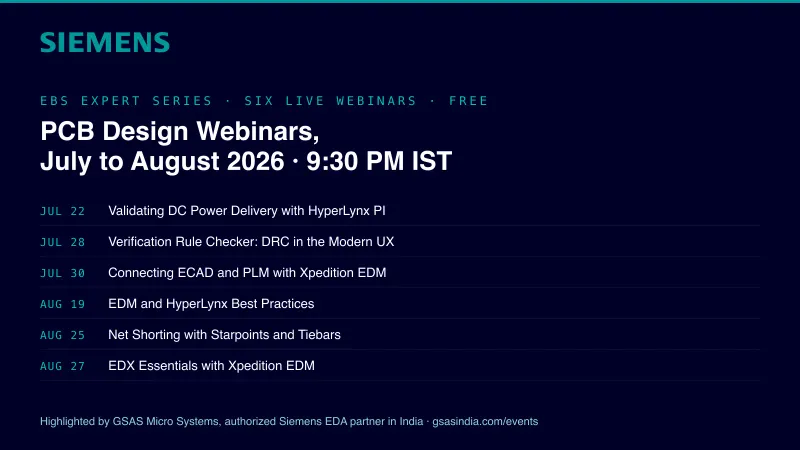
Siemens EDA EBS Expert Series: 6 Free PCB Design Webinars (Jul-Aug 2026)
20 Jul · 8 min

Emulating Processor Power for Thermal Testing: Why Constant Power
7 Oct · 7 min

CRPS and Rack Power Supply Testing: The Six Tests That Matter
7 Oct · 7 min