In short
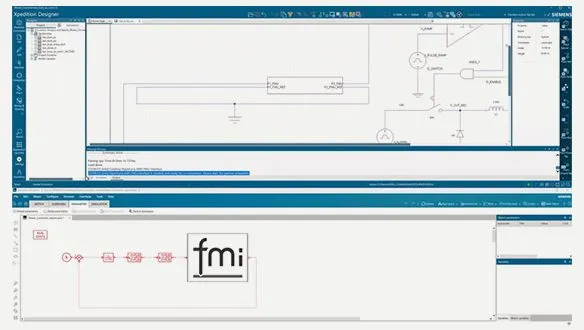
HyperLynx AMS supports FMI co-simulation from its 2510 release: it can export and import Functional Mock-up Units (FMUs), so a circuit modelled on the PCB schematic can co-simulate with models from other FMI-compatible tools, such as a Simcenter Amesim mechanical model.
A power converter depends on its control loop. A stepper motor responds to the drive electronics feeding it. A phone board heats up differently depending on which chip is working hardest. Real products cross domains, and the simulation tools that model each domain usually do not talk to each other.
Siemens EDA has closed part of that gap in HyperLynx AMS, its analog/mixed-signal simulator. A June 2026 Siemens article describes how HyperLynx AMS now exchanges models through the Functional Mock-up Interface (FMI), so a circuit modelled on the PCB schematic can run in the same simulation as a model built in another FMI-compatible tool. This post summarises what changed and where it is useful. The original article is linked under References.
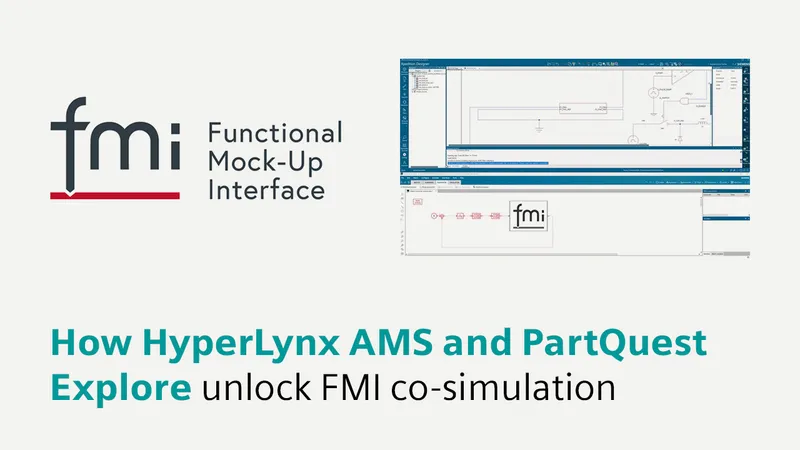
What FMI is
FMI is an open, tool-independent standard that lets different simulation environments exchange data and run as one system. It defines a standard API and a container format, the Functional Mock-up Unit (FMU), which packages a model so one tool can export it and another can import it.
Siemens describes FMI 2.0 as the industry’s prevalent version as of 2025, and notes that over 270 tools across disciplines support FMI. The public list is maintained at fmi-standard.org/tools.
There are two kinds of FMU, and the difference decides how you run a co-simulation:
| FMU type | How it runs |
|---|---|
| Standalone | Fully self-contained. The importing tool runs the co-simulation on its own. |
| Tool-coupling | A communication bridge. Both the exporting and the importing tool run at the same time. |
Because an FMU can be a black box, a domain expert can hand a working model to a colleague in another discipline without that colleague learning the originating tool, and without exposing the model’s internals. For teams working with suppliers or across business units, that IP boundary matters as much as the technical link.
What HyperLynx AMS added in 2510
HyperLynx AMS simulates analog and mixed-signal circuits using SPICE, VHDL-AMS, Verilog-A/AMS and IBIS models, and it is tightly integrated with the PCB design flow: simulation models are assigned directly in the design schematic, which Siemens says reduces errors and time. See our HyperLynx overview for the wider AMS feature set.
From the 2510 release, HyperLynx AMS supports both FMU export and FMU import. Siemens says this lets HyperLynx AMS co-simulate with hundreds of other FMI-compatible tools.
Two worked examples from Siemens
Siemens’ article walks through two demonstrations.
Electromechanical. The electrical subsystem driving a stepper motor is modelled in HyperLynx AMS, and the mechanical system is modelled in Simcenter Amesim. HyperLynx AMS exports a tool-coupling FMU, Amesim imports it, and the two subsystems simulate together.
Thermal-electrical. A standalone FMU exported from Simcenter Flotherm, Siemens’ CFD tool for electronics thermal management, is imported into PartQuest Explore, where an electrical model reproduces a smartphone’s real-world usage. The co-simulation shows each chip’s power dissipation driving its temperature: in Siemens’ example, the RF chip cools during offline gaming while the processor heats up.
Where this pays off
The value of FMI is in the questions a single-domain simulation cannot answer:
- Motor drives and actuators. Does the drive electronics still behave when the mechanical load is realistic rather than an ideal resistor?
- Power conversion with digital control. Does the converter stay stable when the controller model, not an idealised loop, closes the feedback?
- Thermally coupled boards. How do dissipation and temperature move together across a real usage profile, rather than at one worst-case operating point?
These are common questions for the EV, industrial automation and consumer-electronics programmes that Indian hardware teams build and support.
Working with GSAS
GSAS supports the Siemens EDA portfolio in India, HyperLynx included, with local application engineers who work alongside your team on model setup and simulation flows. If you want to set up HyperLynx AMS models on one of your own circuits, talk to us. GSAS has offices in Bengaluru, Hyderabad, Chennai, Pune, Mumbai and Delhi NCR.
References
- Siemens EDA, Electronic Systems Design blog: How HyperLynx AMS and PartQuest Explore unlock FMI co-simulation (1 June 2026)
- FMI standard: Tools supporting FMI
- HyperLynx and the Siemens EDA partner page at GSAS
Also appears in:
Interested in Siemens EDA tools?
Talk to our application engineers for personalized tool recommendations.
More from Siemens EDA
View all →
HyperLynx 2610: What's New for India's Signal and Power Integrity Teams
4 Nov · 6 min
Simulation-Based FMEDA: HyperLynx AMS and Xpedition in the Functional Safety Workflow
4 Nov · 5 min
HyperLynx DSE: Searching Millions of PCB "What If" Scenarios Without Simulating Them All
4 Nov · 5 min
Right-Sizing Decoupling on AMD Versal Boards with HyperLynx PI
4 Nov · 5 min
From Trial and Error to Optimisation: A HyperLynx Workflow for Power Electronics Design
4 Nov · 6 min

Keil Studio for VS Code: A Four-Part GSAS Webinar Series for Cortex-M Teams
4 Nov · 5 min