In short
Per Siemens, Xpedition Advanced and Xpedition Advanced DS support real-time concurrent schematic design for up to two schematic users on different sheets (and constraints) of the same schematic, and a third user on a full Xpedition Advanced seat can open the design in Layout at the same time through flow concurrency. Siemens lists concurrent team layout for Xpedition Enterprise only.
Siemens introduced Xpedition Advanced with the Xpedition 2610 release, announced on 26 October 2026. Siemens’ limit for concurrent schematic design in Xpedition Advanced and Advanced DS is two schematic users at the same time, on different sheets (and constraints), plus a third user in Layout through flow concurrency in Xpedition Advanced. Every product statement below comes from Siemens’ Xpedition Advanced and Advanced DS pages, the Advanced fact sheet, the edition checklist, the buyer’s guide and the “Advanced Logical Design” product introduction in Siemens’ Getting Started guide, all linked under References.
The full edition checklist is on our Xpedition family page. Xpedition Advanced has its own product page.
Who can work at once
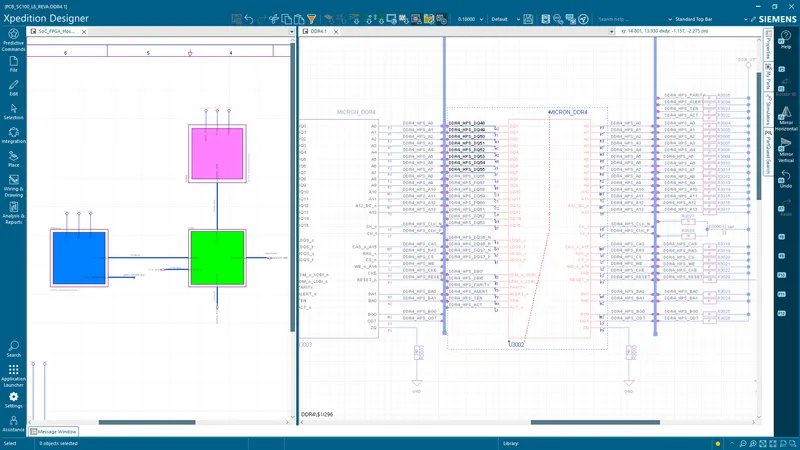
Siemens’ product introduction argues that most PCB schedules are lost to waiting: the schematic must be finished before layout can start, and each handoff adds a queue. It draws the alternative as three users on one project: User 1 and User 2 as designers, and User 3 as layout only.
| User | What Siemens documents | Seat |
|---|---|---|
| Schematic user 1 | Captures the logical design and enters constraints | Xpedition Advanced or Advanced DS |
| Schematic user 2 | Works on different sheets (and constraints) of the same schematic, in real time | Xpedition Advanced or Advanced DS |
| Layout user | Opens the same design in Layout while the two schematic users work | Xpedition Advanced (Advanced DS is schematic-only) |
Per the fact sheet, Xpedition Standard and Xpedition Advanced both support flow concurrency, which Siemens defines as “two users operating within the same project: one on the schematic, one on the layout”. Advanced adds multi-user schematic concurrency, “allowing two hardware engineers to simultaneously edit a single schematic project dynamically, including concurrent constraints”.
Three rows of Siemens’ edition checklist matter here. “Included” is a tick in Siemens’ table and “Not listed” an empty cell.
| Checklist row | PADS Pro Essentials | Xpedition Standard | Xpedition Advanced | Xpedition Enterprise |
|---|---|---|---|---|
| Concurrent team design - schematic | Not listed | Not listed | Included | Included |
| Concurrent team design - layout | Not listed | Not listed | Not listed | Included |
| Table-based design | Not listed | Not listed | Included | Included |
Advanced DS has no column in Siemens’ checklist. It is a schematic-only companion seat to Advanced, covered below.
Where the limit is
- Two schematic users at a time. The FAQ on Siemens’ Xpedition Advanced page says “up to two schematic users”, and the Advanced DS page FAQ repeats it. Advanced DS seats give more engineers access to the schematic, but none of the Siemens sources under References documents more than two editing at once.
- Different sheets. Per the same FAQ, each engineer works on “different sheets (and constraints) of the same schematic in parallel”, so divide the work by sheet first.
- One user in Layout. Concurrent team layout is on the checklist for Xpedition Enterprise only, and the Advanced fact sheet names layout concurrency among the things Enterprise adds. If two people must lay out the same board at once, read Xpedition Advanced vs Xpedition Enterprise.
If one engineer owns the schematic and another owns the layout, Xpedition Standard already covers that through flow concurrency, per the same fact sheet. See Xpedition Standard vs Xpedition Advanced.
What has to be set up
The product introduction lists two prerequisites, quoted as Siemens writes them:
- “A shared location on the local company network”
- “Xpedition Std-Adv allowed through the firewall”
Per the product introduction, the project is built on a single shared iCDB database, which is what lets engineers work “at the same time, on the same project and no merging at the end”. Siemens says Xpedition Advanced starts the iCDB database server whenever the project’s database opens. An additional user joins by opening the project the first user already has in use, and Xpedition “connects that user to the current iCDB host automatically, and work can begin immediately”.
The product introduction stops there: it gives no firewall ports and does not say how a user outside the company network connects. If an engineer works from another site or from home, talk to us before you plan around concurrency.
Constraints are entered concurrently too
Per the product introduction, both logical designers can enter constraints in Constraint Manager at the same time. Each user’s location is shown in the constraint spreadsheets, which Siemens describes as “preventing one engineer from overwriting another’s work in progress”. The fact sheet marks “Design constraints in the schematic environment” as extended for Advanced and Advanced DS, and as core for Standard.
Layout can start before capture ends
Per the product introduction, the layout user does not wait for a finished schematic. Critical components such as connectors and large devices can be placed in the schematic and transferred early, so placement can begin sooner. Later changes “can be forward annotated to the physical design whenever PCB designers are ready to implement the latest schematic”, and gate, signal and part swaps made in layout return to the schematic through back annotation.
So schematic changes reach Layout by forward annotation, at a time the PCB designers choose. Siemens’ “real-time” wording describes the schematic session; the update into Layout is that forward annotation step.
Table-based capture: the Inter Connectivity Table
The checklist does not define its “Table-based design” row. We read it as the Inter Connectivity Table (ICT), for two reasons: the fact sheet names “ICT schematic design” among the Advanced schematic capabilities, and the product introduction documents the ICT, which lets users “connect signals and buses directly in a tabular format”. Per Siemens, connectivity can be authored in Xpedition Designer or prepared in Microsoft Excel and pasted in, and a verified ICT forward annotates to Layout “exactly as a drawn schematic does”. Siemens aims it at wide, repetitive structures such as memory arrays and connector banks, and notes that concurrent capture and the ICT feed the same iCDB database.
What an Xpedition Advanced DS seat is for
Xpedition Advanced DS is a schematic-only seat. Siemens says it “gives additional engineers access to the schematic design capabilities of Xpedition Advanced, including real-time, multi-user schematic design”, so a team can add schematic capacity “without assigning a full Xpedition Advanced license to every user”.
- What it has. Siemens’ Advanced DS page lists multi-user schematic development, hierarchical block design, integrated component search and ECAD model download, variant management, schematic/layout co-design and design review workflows.
- What it lacks. In Siemens’ words, it “does not provide the full PCB layout, performance verification and manufacturing capabilities included with Xpedition Advanced”. In the fact sheet’s capability table, the Advanced DS column is empty for every layout, library, design version management, PLM, ECAD-MCAD co-design, manufacturing, performance analysis and workflow automation row. In the data management group, only “Design review, compare, and markup” is marked for Advanced DS.
- Licensing. Siemens’ buyer’s guide lists Advanced DS, like Advanced, as a named-user subscription. Siemens’ product pages offer both by quote.
- Offline use. Siemens states that an Advanced DS user “can work offline for up to 14-days”, after first going online to log in with Siemens credentials. That figure is published for Advanced DS only. For Advanced, the fact sheet says named-user licensing “supports online and offline work” and gives no number. The Siemens sources under References do not say how offline use and a shared session interact, so ask before you rely on both.
Sizing seats for a three-person team
Siemens says Advanced DS is intended for “additional schematic contributors who need to work concurrently with users developing the complete PCB design in Xpedition Advanced”. Our reading for a small team:
- An engineer who lays out the board, runs signal integrity simulation or prepares manufacturing outputs needs a full Xpedition Advanced seat.
- An engineer who only captures schematics and enters constraints is the Advanced DS case.
If all three engineers capture, two can be in the schematic at once, so decide who is in it and when. The Siemens pages under References do not list every valid seat combination, so confirm the mix when you ask for a quote.
Buying in India
GSAS Micro Systems is an authorized Siemens EDA partner in India. We supply Xpedition Standard with token-based add-ons, Xpedition Advanced, Xpedition Advanced DS and Xpedition Enterprise. We do not publish prices for these products: GSAS quotes in INR with a GST invoice.
Tell us how many engineers capture, how many lay out and where they work, and we will propose a seat mix. GSAS has offices in cities including Bengaluru, Hyderabad, Chennai, Pune, Mumbai and Delhi NCR. Request a quote or book a demo. If you are still choosing an edition, start with our four-edition chooser.
References
- Siemens: Xpedition Advanced (product page and FAQ)
- Siemens: Xpedition Advanced DS (schematic-only seat, offline use)
- Siemens: Xpedition Advanced fact sheet (concurrency wording, Advanced DS column)
- Siemens: Xpedition product family, section “Choose the right PCB design solution for you” (edition checklist)
- Siemens: Getting Started guide for Xpedition Advanced, product introduction “Advanced Logical Design” (iCDB database, prerequisites, constraints, ICT)
- Siemens: Xpedition buyer’s guide (named-user licensing)
- Siemens EDA, Electronic Systems Design blog: What’s new in Xpedition 2610 (26 October 2026)
Also appears in:
Interested in Siemens EDA tools?
Talk to our application engineers for personalized tool recommendations.
More from Siemens EDA
View all →
PADS Pro Essentials vs Xpedition Standard: Which One to Start With
18 Nov · 8 min
From Layout to Fabrication in Xpedition Advanced: BluePrint, Panels, DFM
18 Nov · 10 min
Getting Started with Xpedition Advanced: An Onboarding Checklist
18 Nov · 8 min
High-Speed PCB Design in Xpedition Advanced: Constraints, Routing and SI
18 Nov · 9 min
Rigid-Flex PCB Design in Xpedition Advanced: Stackups, Bend Areas and 3D
18 Nov · 8 min
Xpedition Advanced vs Xpedition Enterprise: Where Advanced Stops
18 Nov · 8 min