In short
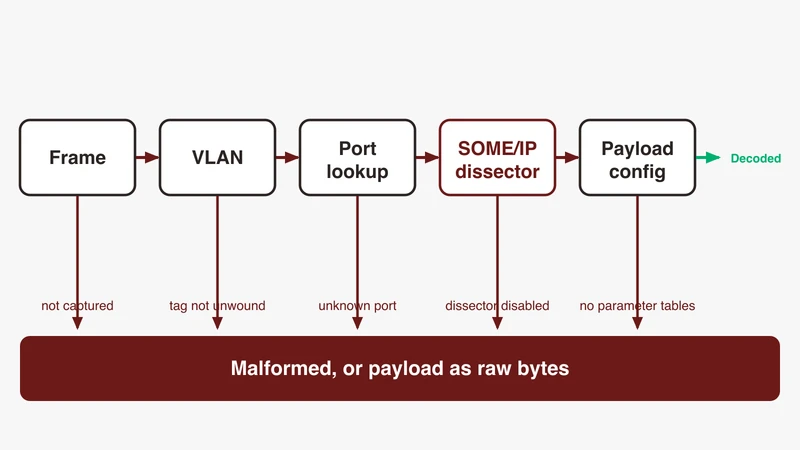
SOME/IP fails to decode in Wireshark when the SOME/IP dissectors are disabled or the capture uses a port Wireshark was never told about: enable them under Analyze, Enabled Protocols, then map the UDP and TCP ports. The dissector source registers SOME/IP on udp.port and tcp.port with an empty default range and registers its UDP and TCP heuristics as disabled, so a fresh install decodes nothing until you supply the ports.
A SOME/IP capture that will not decode looks like a broken capture. The packet list says Malformed DNS, or plain UDP with a Data payload, and the natural conclusion is that the ECU is emitting garbage or the tap dropped bytes. Wireshark has not been told these bytes are SOME/IP.
The reason is in the dissector source. Wireshark binds SOME/IP to UDP and TCP through a preference-backed port range whose default value is an empty string, and registers its UDP and TCP heuristic dissectors with the disabled flag. A fresh install claims no port and volunteers nothing. That is deliberate, because SOME/IP port numbers are set per vehicle programme, but it means your first capture decodes as something else. What follows is the ordered fix list, every claim checked against the dissector source, the Wireshark documentation, the public AUTOSAR specifications, or the ask.wireshark.org threads where engineers hit this.
The symptom, and what “Malformed” is actually telling you
Malformed is not a protocol, it is Wireshark reporting a dissector exception
The Wireshark wiki page for the malformed protocol is direct: it is not a real protocol itself, but is used by Wireshark to indicate a problem while dissecting the packet data, a pseudo dissector. The mechanism is that the dissector in charge tried to read from the packet data at an offset simply not existing, raising an internal exception. The page names three causes: the protocol data is malformed, the dissector is buggy, or the wrong dissector was used. The user guide splits that into four reasons for a [Malformed Packet] marker, adding “packet not reassembled”, and for the wrong-dissector case says this will happen if you are using a protocol not on its well known TCP or UDP port, pointing at Analyze, Decode As.
That is the diagnosis in one line: the label names the dissector that raised the exception, not the protocol on the wire.
Why SOME/IP traffic can surface as malformed DNS, UDP or TCP
This is the detail that sends engineers looking at the wrong thing, because “Malformed DNS” reads like a claim about the traffic.
The mechanism is heuristic dissection. When a UDP payload arrives on a port no dissector has claimed by exact match, Wireshark offers it to the heuristic dissectors on the udp table. DNS registers one: packet-dns.c calls heur_dissector_add("udp", dissect_dns_heur, "DNS over UDP", "dns_udp", proto_dns, HEURISTIC_ENABLE), and that final flag means enabled by default. SOME/IP registers its equivalents with HEURISTIC_DISABLE.
So on such a port DNS is in the pool of guessers and SOME/IP is not. Which dissector ends up raising the exception depends on the bytes; the label names the guesser, not the traffic.
Malformed UDP or Malformed TCP is the same rule one layer down: the exception came from the transport dissector itself, pointing at truncation or incomplete reassembly rather than a wrong upper-layer guess. Fix 4 covers that branch.
The public record is ask.wireshark.org question 29173, filed 25 October 2022. The engineer had built Wireshark 4.0.0 from source on Ubuntu, git commit 0cbe09cd796b, and reported that the same SOME/IP pcap read fine on Windows while Linux showed only “Malformed DNS/UDP/TCP Packages”. A responder in the thread asked whether the same version, capture file and configuration profile were in use on both. Two weeks later the poster answered their own thread in a comment: they had not enabled the SOME/IP TCP and UDP protocol, and their note reads “Analyze -> Enabled Protocols -> check all lower layer SOME/IP protocols”.
Header decoded but payload is raw bytes: a different problem
Check what you have before you spend an hour on ports. If the detail pane already shows a SOME/IP tree with service ID, method ID, length, client ID, session ID, protocol and interface version, message type and return code, and only the payload below is an undifferentiated byte run, decoding is working and nothing here will improve it.
The SOME/IP header is self-describing. The payload is not, so Wireshark needs configuration tables naming the parameters and their types. The dissector carries a preference labelled “Dissect Payload”. That preference is enabled by default, so on a stock install the payload dissector is already running; what is missing is the parameter configuration. Only if a profile has turned it off will you see the expert info reading that dissection of payload is disabled. In an OEM programme the tables come out of ARXML, the subject of the companion article on ARXML-based payload configuration. For the header layout, our SOME/IP explainer walks the 16 bytes offset by offset.
Two-minute triage: does the frame reach Wireshark at all
Clear the display filter and look at the raw frame count and the source MAC addresses. If the ECU’s MAC appears, the capture path is live and this is a dissection problem. If you see only your own host’s traffic, go straight to Fix 4.
This is easy to hit on a developer machine. In ask.wireshark.org question 33077, an engineer running the open-source COVESA vsomeip subscribe-notify example under WSL 2 saw the example work while Wireshark showed nothing. A Wireshark developer answered that you have to run Wireshark in the same context as the code under test, or the capture setup itself is the issue.
Fix 1: turn the SOME/IP dissectors back on
Analyze, Enabled Protocols, and what a profile can ship disabled
Open Analyze, then Enabled Protocols. The user guide describes the search field as case-insensitive and matching any dissector containing the search string, so typing someip narrows the list. Two dropdowns sit above it: one limits the view to enabled or disabled dissectors, the other to heuristic or non-heuristic ones.
One property of the dialog explains a symptom that looks unrelated: the guide warns that disabling a protocol prevents higher-layer protocols from being displayed, so disable IP and a packet with Ethernet, IP, TCP and HTTP shows only the Ethernet. A shared profile with something disabled two layers down presents as “SOME/IP does not work”.
Enable every lower-layer SOME/IP entry, not only the top one
That wording maps onto a real structure. The source registers three handles under the SOME/IP protocol, someip_udp, someip_tcp and someip, and separately registers two heuristic dissectors named “SOME/IP over UDP” and “SOME/IP over TCP”, short names someip_udp_heur and someip_tcp_heur, both disabled. The user guide notes that heuristic dissectors appear as subtrees in the protocol list, which is why they are missed when you tick only the top-level SOME/IP row.
Enabling the heuristics is a reasonable diagnostic step and a poor production habit: heuristics guess, the port table is deterministic. Use them to confirm your frames really are SOME/IP, then do Fix 2 and turn them off. tshark -G heuristic-decodes prints one record per line with the table name, decoder name, whether it is enabled, whether it is enabled by default, the short name and the display name. tshark --enable-heuristic someip_udp_heur enables one for a single run.
SOME/IP-SD is a separate entry from SOME/IP
Service discovery is its own protocol: proto_register_protocol("SOME/IP Service Discovery Protocol", "SOME/IP-SD", "someipsd"). It has its own row and can be disabled independently.
It is also dependent on SOME/IP, and not through a port. The SD dissector attaches to the someip.messageid table at message ID 0xffff8100, which the AUTOSAR Foundation R21-11 SOME/IP-SD specification defines as the SD message ID, service ID 0xFFFF with method ID 0x8100. SOME/IP must therefore have claimed the frame and parsed the header before SD is offered anything. Enabling SD while SOME/IP is unbound produces no SD rows and no error.
Fix 2: tell Wireshark which ports carry SOME/IP
Decode As for one capture, the ports table for a bench you will reuse
Decode As is the fast path. Right-click a frame, choose Decode As, and the dialog opens pre-populated from that packet. Set the field to UDP port or TCP port, Value to your port, Current to SOME/IP. The user guide is explicit about the catch: these settings are lost if you quit Wireshark or change profile unless you save them. Press Save, not OK.
The persistent path is the SOME/IP protocol preferences. The dissector binds itself with dissector_add_uint_range_with_preference("udp.port", "", someip_handle_udp) and the matching TCP call, where the second argument is the default range. It is empty, and that empty string is why a clean install decodes nothing. Filling the range under Edit, Preferences, Protocols, SOME/IP is the durable fix. For a scripted run, tshark -d udp.port==30509,someip_udp uses the -d syntax the manual documents for Decode As.
Service discovery ports versus RPC ports, and why only one is fixed
Two different questions with different answers.
Service discovery has a default. The AUTOSAR SOME/IP-SD specification lists SD_PORT among its configuration parameters as a UDP port for SD messages with 30490 as default, its endpoint option text specifies the L4-Port field as the transport layer port of SOME/IP-SD, currently 30490, and it requires SD messages to be sent over UDP. The vsomeip configuration in ask.wireshark.org question 33077 uses the same value. So 30490 UDP is a defensible first guess for SD, and only for SD.
RPC ports have no default you can safely assume. The AUTOSAR Foundation R21-11 SOME/IP Protocol specification gives the reason: instance IDs are not carried in the SOME/IP header, so a service instance is identified through the service ID combined with the socket, meaning IP address, transport protocol and port number. The port carries identity, so it is assigned per programme: take the number from the network design, or read it off the wire.
Let SD do the mapping for you
Once SOME/IP-SD is decoding, Wireshark learns the RPC ports from the SD messages. The SD dissector walks the endpoint options of each entry, extracts the L4 protocol and L4 port, and calls the exported register_someip_port_udp or register_someip_port_tcp to bind that port for the rest of the session.
So capture order matters. If your capture starts after the offers have gone out, Wireshark never sees the endpoint options, never learns the ports, and the RPC traffic falls back to the unclaimed-port behaviour that produced Malformed DNS. Capture from before the ECU powers up, or supply the ports by hand. The same dissector exposes, under its own preferences at Edit, Preferences, Protocols, SOME/IP-SD, the ranges “UDP Ports ignored” and “TCP Ports ignored”, described in the source as port ranges not automatically added by SOME/IP-SD. Both default to empty; populated in a shared profile, they let SD parse and still refuse to bind the ports it just read.
Making the mapping survive a profile switch
Everything in Fix 1 and Fix 2 lives in the configuration profile. The SOME/IP configuration tables are declared with the from-profile flag set true, so they are read from the active profile’s directory, and Decode As entries are lost on a profile change unless saved. Build a profile per programme and keep it in version control alongside the network design. tshark -G folders prints the personal configuration directory, tshark -C <profile> runs against a named one.
Fix 3: check the transport assumptions before blaming the dissector
UDP and TCP carriage of the same service
A service can appear on both. The AUTOSAR SOME/IP specification advises using TCP only when very large chunks of data need transporting, above 1400 bytes, with no hard latency requirements in the error case, and recommends an instance use the same port number for UDP and TCP. Map both ranges, not one.
VLAN tags, stacked tags and encapsulation
A single 802.1Q tag needs no configuration. Stacked tags do. The Wireshark VLAN dissector carries a preference described in the source as the “802.1QinQ Ethertype (in hex)”, used to indicate 802.1QinQ VLAN in VLAN tunneling. If the outer tag on your link uses a different Ethertype, the inner tag is never unwound and IP, UDP and SOME/IP are never reached. Count the VLAN layers Wireshark actually rendered.
Wrapped captures are the harder case: a capture-module wrapper must be decoded before the Ethernet frame inside it exists. Wireshark ships dissectors for both open wrapper formats and they differ. TECMP binds to its own Ethertype and decodes without configuration. ASAM CMP registers on udp.port for Decode As with a preference and no default port, so you must name the UDP port. Both hand the payload to the Ethernet dissector, so the rest of this article then applies normally.
SOME/IP-TP segments and TCP reassembly
Two settings, two layers. SOME/IP-TP is the AUTOSAR mechanism for UDP messages too large to fit in an IP packet: the specification gives 32 KB as its example, requires the TP flag in the message type set to 1, places a TP header directly after the SOME/IP header, and requires all segments of one original message to carry the same session ID. Wireshark reassembles these for you; the SOME/IP preference “Reassemble SOME/IP-TP” is enabled by default, so check it only if a shared profile has turned it off. With it off, segments decode individually and the original message is never rebuilt.
TCP is separate. The user guide describes “Allow subdissector to reassemble TCP streams” as enabled by default, marking all but the final segment [TCP segment of a reassembled PDU]. Turned off for sequence-number analysis, it breaks SOME/IP messages spanning segments. The related “Reassemble out-of-order segments” is documented as disabled by default, which matters on a busy mirror port. The SOME/IP dissector adds a preference to test TCP segments for valid SOME/IP, described in the source as helpful for resyncing after missing segments.
Fix 4: the capture is wrong, not the decode
Snaplen truncation
Wireshark has a distinct marker: [Packet size limited during capture], documented in the user guide as meaning the packet size was limited during capture and the dissector ran out of packet bytes and had to give up. The guide’s advice is blunt: repeat the capture with a higher or no packet size limit. In tshark, -s 0 specifies a snapshot length of 262144 so the full packet is captured, and that is the default. A short snaplen with a long payload gives a header that decodes and a payload that is cut, easy to misread as a payload configuration problem.
Mirror ports, taps and dropped tags
A mirror or SPAN configuration can strip VLAN tags, drop one direction, or discard frames under load, and none of that appears as an error in the capture file. If the SD offers are missing but the service clearly came up, suspect the mirror before the ECU: compare a passive tap capture against the mirror on the same traffic, and a difference in frame count or VLAN headers tells you which to trust.
Checksum offload marking valid frames as bad
The Wireshark wiki page on offloading describes this precisely. On systems that support checksum offloading, IP, TCP and UDP checksums are calculated on the NIC just before transmission, and Wireshark captures packets before they reach the network adapter, so it does not see the correct checksum. Outgoing packets show up marked black with red text and the note [incorrect, should be xxxx (maybe caused by "TCP checksum offload"?)].
The same page records the mitigations: new installations of Wireshark 1.2 and above disable IP, TCP and UDP checksum validation by default, and Wireshark 4.2 and above detects the partial checksums Linux and Windows leave in the field rather than marking them invalid. On Linux, ethtool --show-offload ethX inspects the setting and ethtool --offload ethX rx off tx off disables it. Segmentation offload is the related trap, manifesting as packets larger than expected, such as 2900 bytes on a 1500-byte MTU network.
One-direction-only captures
On a switched link you may be seeing requests and not responses, or the reverse. SOME/IP without the offer side looks like an unresponsive service; without the request side, like unsolicited events. Confirm both MAC addresses appear as sources before concluding anything about behaviour. Our note on physical-layer decode with a scope covers the case where the protocol view gives you nothing.
Fix 5: version, profile and platform differences
Same file, two machines, different result
This is the 29173 scenario, and the checklist is short. Compare, in order: the configuration profile in use, the enabled-protocol state, the SOME/IP port preferences, and the Wireshark version. The capture file carries none of them. tshark -G folders shows which personal configuration directory each machine reads, and tshark -o tests a preference for one run without disturbing the profile.
Export the profile, not the screenshot
A screenshot of a preferences dialog is not a configuration. The profile directory is, and it holds the enabled-protocol list, the preferences file and the SOME/IP configuration tables. Zip it and hand that over. Switch with tshark -C or the profile selector in the status bar.
Confirm what your build supports before filing a bug
tshark -G protocols | grep -i someip confirms the SOME/IP and SOME/IP-SD dissectors are compiled into your build; the three tab-delimited fields are protocol name, short name and filter name. The user guide’s advice is to disable the suspect dissector and see how the packet displays then, which separates a dissector fault from wrong data. If the header still fails to parse against the AUTOSAR field layout, you have a defect worth reporting, and a small anonymised capture is what maintainers ask for first: in ask.wireshark.org question 28097, an engineer reported malformed SOME/IP packets after subscribing to a service, the only response was a request for a shareable anonymised capture, and the thread ended there without one.
Symptom to cause lookup table
| Symptom in the packet list | Likely cause | Fix | Where to verify |
|---|---|---|---|
| Malformed DNS on UDP | Port unclaimed, a heuristic dissector took the frame | Add the port to the SOME/IP UDP range, or Decode As | Frame detail shows a non-SOME/IP dissector at the top |
| UDP rows with a Data payload | Port unclaimed, no heuristic claimed it | Fix 2, ports table | Frame detail ends at UDP |
| No SOME/IP rows at all, frames present | SOME/IP disabled in the profile | Fix 1, Analyze, Enabled Protocols | tshark -G heuristic-decodes, grep someip |
| SOME/IP rows present, no SOME/IP-SD rows | UDP 30490 not in the SOME/IP port range, SD disabled, or SD traffic not captured | Add 30490 to the SOME/IP UDP range, check SOME/IP-SD is enabled, confirm SD frames are in the capture | SD attaches at message ID 0xffff8100 |
| SD decodes, RPC traffic does not | Capture started after the offers | Capture from power-up, or map ports by hand | Check the SD ignore-port preferences are empty |
| Header decodes, payload is raw bytes | Payload tables not configured | Payload configuration from ARXML | SOME/IP preferences: Dissect Payload is on, but no parameter tables are loaded |
[Packet size limited during capture] | Snaplen truncation | Recapture with full snaplen | Capture options, or -s 0 |
| Checksum incorrect on your own frames | Checksum offload | Ignore, or disable offload with ethtool | Wireshark wiki, CaptureSetup/Offloading |
| Nothing at all in the capture | Wrong interface or wrong context | Fix 4, capture path | ask.wireshark.org 33077 |
| Frames stop at Ethernet | Unhandled stacked VLAN or wrapper | VLAN QinQ Ethertype preference, or decode the wrapper first | Count the VLAN layers in the frame detail |
Filters worth keeping
someip for everything the dissector claimed, someipsd for service discovery only, and malformed to isolate exception frames, since there is no malformed field to filter on. udp.port == 30490 confirms SD traffic is present regardless of whether it decoded. udp && !someip, on a capture you believe is all SOME/IP, finds the ports you have not mapped yet.
When to conclude the ECU really is sending malformed frames
Only after all five fixes: SOME/IP and SOME/IP-SD enabled, the port bound by exact match rather than heuristic, the frame not truncated, the VLAN and wrapper stack unwound, reassembly on at both layers, and the same file behaving the same way on a second machine with a fresh profile. Then the wiki’s other two causes are live, a dissector defect or genuinely malformed data, and you tell them apart by reading the bytes against the AUTOSAR header layout by hand.
Where GSAS fits
The fixes above are preferences problems, and you should not need help with them. What tends to need a second pair of eyes is the layer underneath: whether the capture path shows the traffic faithfully, whether the tap or mirror suits the link, and whether the bench reproduces the vehicle closely enough for the result to mean anything.
GSAS Micro Systems is an engineering partner for automotive Ethernet validation in India. Our applications engineers work with teams on bench bring-up, capture-path review, and correlating protocol behaviour with the physical layer. We are in Bengaluru, Pune, Chennai and Hyderabad, and we work in IST hours.
If a SOME/IP bring-up is stalled on something that is no longer a preferences problem, see our automotive Ethernet capabilities or request a quote, and we will scope the bench with you.
Also appears in:
Building for Automotive & Mobility?
Talk to our application engineers for personalized tool recommendations.