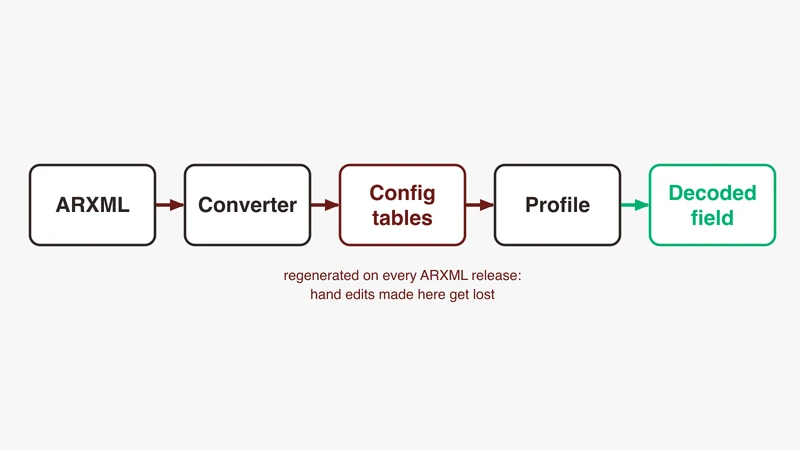
In short
Wireshark decodes SOME/IP headers directly from the wire, but payload fields need parameter definitions the dissector reads from its own configuration tables. Generate those tables from a FIBEX 4 description of your services with the open FibexConverter project, copy them into a Wireshark profile, and restart. The dissector does not read ARXML, so an ARXML-only toolchain needs a FIBEX export first.
You have a capture open, the SOME/IP header decodes cleanly, service and method IDs look right, and the payload is one grey block of bytes. Or worse, the packet detail pane carries a red line that reads:
SOME/IP: Payload: item->data_type (0x0) unknown/not implemented yet! name: (NULL), id_ref: 0x0That message is not a bug and not a broken capture. It is the dissector telling you its payload configuration is incomplete. This article covers what the dissector needs before it can name a single field, how to generate that configuration, why the ARXML your project owns is not the input the open tooling takes, and how to check that a decode is right rather than plausible.
Everything structural here comes from public sources: the Wireshark dissector packet-someip.c, the FibexConverter project, the Wireshark user guide, and the AUTOSAR SOME/IP Protocol Specification on autosar.org.
Two different failures that look the same
Work out which failure you have first. The fixes share no steps.
Header decodes, payload is a byte blob
The packet list shows SOME/IP, the detail tree expands through Service ID, Method ID, Length and the rest of the header, and then comes a single Payload item of raw bytes. That is this article: the dissector understands the framing and knows nothing about the contents.
If instead the frames show as UDP or as a malformed higher-layer protocol with no SOME/IP tree at all, the problem is upstream of anything here, in port mapping, disabled dissectors or transport assumptions. Work through the SOME/IP decoding fix list first and come back once the header is readable.
The error string, in plain English
The dissector routes each configured parameter through a switch on its type. In dissect_someip_payload_parameter, the recognised cases are base type, string, array, struct, union, typedef, enum and bitfield. Anything else lands in the default branch, which emits the expert info above and appends [SOME/IP: Payload Config Error] to the Info column.
Wireshark will not accept a half-filled row: the parameter list’s update callback rejects an empty Parameter Name, an empty Filter String, and any Parameter Type outside 1 to 8. So the zeros are not a bad row, they are a missing one. The dissector allocates the parameter array from the Number of Parameters column and zero-fills it, then fills each slot from the row whose Parameter Position matches. Any position with no row left stays zero, and the dissector walks it anyway. Check two things: that Number of Parameters equals the number of Position rows you supplied for that Service ID, Method ID, Version and Message Type, with positions numbered 0 upward and no gaps, and that every row for that key carries the same Number of Parameters value, because rows that disagree with the first one are dropped without a message.
Why the dissector cannot infer field layout from the wire
SOME/IP serialisation is positional. The AUTOSAR specification describes struct serialisation as close to the in-memory layout, with parameters written sequentially, and states that the implementation shall not automatically insert padding data. Nothing on the wire says “the next four bytes are a float32”.
Field boundaries therefore exist only in the interface description, and without it a payload is an undifferentiated byte string that no heuristic recovers. That is why an optional tag-length-value extension exists for structs and arguments with identifiers, and why the dissector carries a separate WTLV column: those encodings do carry tags, and are the exception rather than the base case.
What the SOME/IP dissector actually needs
Thirteen tables, not one configuration file
The dissector registers thirteen user accessible tables, each backed by a file in the profile directory. From packet-someip.c:
| Table in preferences | File on disk |
|---|---|
| SOME/IP Services | SOMEIP_service_identifiers |
| SOME/IP Methods/Events/Fields | SOMEIP_method_event_identifiers |
| SOME/IP Eventgroups | SOMEIP_eventgroup_identifiers |
| SOME/IP Clients | SOMEIP_client_identifiers |
| SOME/IP Parameter List | SOMEIP_parameter_list |
| SOME/IP Parameter Base Type List | SOMEIP_parameter_base_types |
| SOME/IP Parameter String List | SOMEIP_parameter_strings |
| SOME/IP Parameter Arrays | SOMEIP_parameter_arrays |
| SOME/IP Parameter Structs | SOMEIP_parameter_structs |
| SOME/IP Parameter Unions | SOMEIP_parameter_unions |
| SOME/IP Parameter Typedef List | SOMEIP_parameter_typedefs |
| SOME/IP Parameter Enums | SOMEIP_parameter_enums |
| SOME/IP Parameter Bitfields | SOMEIP_parameter_bitfields |
The first four are naming only. They turn numeric IDs into readable names and make display filters legible. They do not decode a single payload byte.
The other nine describe structure. SOMEIP_parameter_list is the entry point: its columns are Service ID, Method ID, Version, Message Type, a WTLV flag, Number of Parameters, and then per parameter a Parameter Position/ID, a Parameter Name, a Parameter Type, an ID Reference and a Filter String. The Filter String is mandatory and must be a legal field-name fragment: no dots, no spaces, and Wireshark rejects the row outright if it is empty. Everything else is reached through that ID Reference.
Where the tables live, and why they travel with the profile
The FibexConverter README gives the Wireshark configuration folder as ~/.config/wireshark/ on Linux and macOS and %APPDATA%\Wireshark\ on Windows. The Wireshark user guide’s configuration profiles section lists “Most User Accessible Tables” among the configuration files stored in each profile, alongside preferences, display filters and coloring rules.
That is the useful property. A named profile is a self-contained decoding environment for one project and does not disturb your default setup, and the same section notes profiles can be exported to and imported from zip archives. The README adds one operational detail: stop Wireshark before copying, because it loads these files only at startup.
The minimum set to decode a single event
Do not attempt a whole cluster on the first pass. To read one event you need a row in SOMEIP_parameter_list per parameter, keyed on Service ID, Method ID, Version and Message Type, and a row in whichever type table each parameter references. That is all the payload dissector looks up. Rows in SOMEIP_service_identifiers and SOMEIP_method_event_identifiers are worth adding at the same time because they make the packet list readable, but the payload decodes without them.
Get that working against a frame you can predict, then scale. A configuration that decodes one known event correctly is a foundation; one that decodes forty with no verified reference is a guess.
From ARXML to dissector configuration
FibexConverter: what it takes and what it writes
FibexConverter is the open project that generates these tables. Its README describes it as converting SOME/IP configuration from FIBEX 4 XML files, the ASAM standard, to output formats including Wireshark dissector configs. All its tools share one invocation pattern:
python3 <script>.py FIBEX <file-or-directory> [options]For Wireshark output that is configuration_to_wireshark_config.py, and the README documents three version-specific output directories:
example-file/wireshark_3.4_and_earlier/
example-file/wireshark_3.5_to_4.4/
example-file/wireshark_4.5_and_later/
Each holds hosts, VLAN IDs and the SOME/IP service, method, event and eventgroup configs. The script’s output listing names the parameter files it writes, and they match the dissector’s filenames exactly, from SOMEIP_parameter_list through to SOMEIP_parameter_bitfields. Pick the directory matching your Wireshark version, because the formats differ. Note that the bitfields file is only written into the 4.5-and-later directory, since the bitfields table does not exist in earlier dissectors.
One detail that saves time: passing a directory rather than a single file makes the tool glob for FBX*.xml, so a folder of descriptions named otherwise silently yields nothing. The README also notes that SOME/IP dissector support arrived in Wireshark 3.2.
The ARXML gap, and what to do about it
Now the honest part. The project’s parser_dispatcher.py accepts FIBEX plus one other vendor-specific format, and handles exactly those, printing Type ... not known/supported! for anything else. There is no ARXML parser in the repository, and the README’s --plugin option is passed to the FIBEX parser, so it customises FIBEX parsing rather than adding a format.
The asker on question 14660 saw this coming in February 2020, writing that payload dissection “is more for Fibex4 xml files than arxml files that we use”. Still true: the table columns are shaped around a FIBEX-style service description, and Wireshark ships no ARXML importer.
The pipeline therefore has a stage the open tooling does not fill. Three routes exist, worth costing before picking one:
Export FIBEX 4 from the toolchain that owns the ARXML. AUTOSAR’s system description and FIBEX share ancestry, and many toolchains can emit a FIBEX 4 service description alongside their native output. Cheapest route when the export exists, and it keeps one source of truth upstream. Ask before assuming it is unavailable.
Write a converter for your own ARXML profile. Every programme uses a subset of ARXML. A script that walks the service interface packages you actually use and emits the nine parameter files is bounded work, and the formats are visible in FibexConverter’s writer functions and in the dissector’s table definitions. This pays back over repeated releases.
Populate the tables by hand. Wireshark’s preference dialogs edit every one of these tables directly. For five signals on one event during a bring-up, that beats any automation. For a cluster it is a trap, for the reasons in the reproducibility section below.
Dropping the files into the right profile and reloading
Create a named profile, quit Wireshark, copy the generated files into that profile’s directory under your configuration folder, then start Wireshark and select the profile. Confirm the load by opening the SOME/IP protocol preferences: the rows should be there.
If you are running headless, tshark accepts -C <configuration profile>, which is what makes a generated configuration usable in a regression script rather than only at a desk.
First verification: one event, one field, one expected value
Pick a frame you can reason about independently, then check three things: that the field name appears in the tree, that its value matches what the sending ECU should be producing, and that the payload subtree ends exactly where the SOME/IP length field says it should.
Parameter types and the mappings that go wrong
The type encodings
The Parameter Type column is a small integer, and the dissector’s own column help spells out the full set: 1 base, 2 string, 3 array, 4 struct, 5 union, 6 typedef, 7 enum, 8 bitfield. A comment on question 14660 records the first three, worked out from the field hint; the dissector confirms the rest.
The same encoding appears in the array, struct, union, enum and typedef tables, since each can reference a member of any type. Composition is expressed by an ID Reference into another table, not by new type numbers.
Base types, and the 2020 configuration that no longer validates
A follow-up comment from the asker on question 14660 lists a base type table containing uint12, uint3 and uint1 entries with matching bit lengths. Copy that pattern into a current Wireshark and it will be rejected.
The dissector’s base type validation callback accepts uint8, uint16, uint32, uint64, int8, int16, int32, int64, float32 and float64, requires the base and encoded bit lengths to match the named width, and otherwise returns an error such as Data Type uint can be 8, 16, 32, or 64 bit. Single-bit flags now belong in SOMEIP_parameter_bitfields, which wraps an 8, 16, 32 or 64 bit container and names one bit at a time by position. That covers the uint1 entries. There is no table that expresses a 12 bit or 3 bit integer value, so packed sub-byte integers have to be read as the whole container and shifted by hand, or moved out of the wire format. That matches the specification, which states bitfields shall be transported as unsigned uint8, uint16, uint32 or uint64 datatypes.
That configuration was accepted when it was posted: Wireshark 3.2 validated only the ID and the endianness flag on a base type row. If an internal wiki quotes it, this is the paragraph to point at.
Structs, unions and enums: composition, not new primitives
A struct row carries an ID, a name, a Length of Length Field in bits, a Pad to value, a WTLV flag, a Number of Items, and then per member a Position, Name, Parameter Type and ID Reference. Nesting is a struct member whose type is 4 and whose reference points at another struct.
Unions carry runtime type information, so they get their own shape. The AUTOSAR specification defines a union as a length field of 32, 16, 8 or 0 bits, then a type selector field of 32, 16 or 8 bits, then payload including padding. The length field covers payload and padding in bytes and excludes both fields themselves. Zero bits means no length field is written, and then all types in the union must be the same length. The dissector’s union table mirrors this with Length of Length Field and Length of Type Field columns.
Enums are not a wire-level construct. The specification is explicit: enumerations are not considered in SOME/IP and shall be transmitted as unsigned integer datatypes. The dissector routes them through the same handler as type 1, with the enum table supplying value names for display.
Strings: encoding, length field and the terminator
Strings carry more rules than any other type. UTF-8 strings shall be zero terminated with a \0, ending with a 0x00 byte. UTF-16LE and UTF-16BE strings shall be zero terminated with at least two 0x00 bytes and shall have an even length, and if the length is odd the last byte shall be ignored. All strings shall start with a byte order mark, three bytes for UTF-8 or two for UTF-16, in fixed and dynamic length strings alike.
For dynamic length strings the length field comes first, is measured in bytes, sits before the BOM and includes it in the count; it is 8, 16 or 32 bits by configuration, defaulting to 32. Fixed length strings may start with an optional length field, are still \0 terminated, and their length in bytes including that terminator comes from the data type definition.
The dissector’s string table exposes these knobs directly: Encoding as ascii, utf-8 or utf-16, a Dynamic Length flag, Max Length, Length of Len Field in bits, a Big Endian flag and Pad to. The trap is arithmetic. If your max length excludes the terminator or the BOM but the sender includes them, the string still renders, and every field after it reads from the wrong offset.
Arrays: fixed length versus dynamic length
The array table takes an ID, a name, a Parameter Type and ID Reference for the element type, a Number of Items meaning the count of dimensions, and then per dimension a Dimension index, Lower Limit, Upper Limit, Length of Length Field and Pad to.
One rule from the specification decides whether your numbers are right: the length field at the beginning of a dynamic length array specifies the length of the array in bytes, and does not include the size of the length field itself. Not the element count: bytes. It is 8, 16 or 32 bits by configuration, defaulting to 32, and in multidimensional arrays every sub array of different dimensions has its own.
The dissector enforces the fixed-length side too. A dimension with no length field whose Lower Limit and Upper Limit differ raises Static array config with Min!=Max and stops. That is configuration feedback, not a capture problem.
Endianness and alignment
SOME/IP header fields are encoded in network byte order, big endian, and the specification lists the payload fields that follow the same rule: the length fields of extensible structs, strings, arrays and unions, plus TLV tags and the union type field. Base type values are separate, which is why the base type table carries a per-type Big Endian flag rather than one global setting.
Alignment is the quiet one. The specification says padding is inserted after variable size data when that data is not the last element in the stream, that alignment is always calculated from the start of the SOME/IP message, that there shall be no padding behind fixed length data elements, and that alignment behind variable length elements shall be 8, 16, 32, 64, 128 or 256 bits. That maps to the Pad to column in the struct, array, string and union tables. Set it wrong and the fields before the pad still read correctly, which is what makes it hard to spot.
When the source description is the problem
Not every failure is in the tables. Some are upstream.
Partial deliveries. A description referencing data type packages it does not contain produces parameter rows pointing at IDs that never resolve. The symptom is the error string at the top of this article with a non-zero id_ref, which is the useful variant: the row was populated and the target is missing.
Signal-based and service-based in one delivery. Larger programmes carry both classic signal PDUs and service oriented interfaces in one description. FibexConverter writes separate Signal PDU files for the former, configured through different Wireshark tables, so loading only the SOME/IP set and expecting signal PDUs to decode will disappoint.
Variants and post-build configuration. If service instances or port assignments resolve at post-build time, the description you were given may be a superset. The generated tables then carry services that never appear, which is harmless, and may miss the variant deployed, which is not.
Verifying the decode instead of trusting it
A wrong decode does not announce itself. It produces numbers.
Cross-check against something you already know. A rolling counter that should increment by one per message, a constant that should not change, a signal you can force from the bench and watch move. One verified field anchors every offset before it.
Check that the last field ends at the payload boundary. This tests the whole layout at once. The SOME/IP length field says how many bytes follow; if your configured fields consume fewer or more, something between the first field and the last is the wrong width. Select the last decoded item and compare the byte range it highlights against the end of the payload.
Save the display filters. The dissector registers each configured payload field under someip.payload.data., followed by the Filter String column you supply per parameter, so a field with Filter String wheel_speed filters as someip.payload.data.wheel_speed. The column help in the preference dialog says the prefix is someip.payload.; the source uses someip.payload.data, so trust the field name Wireshark shows in the status bar when you select the item. Keep someip.payload.expert_config_error, someip.payload.expert_malformed and someip.payload.expert_alignment_error to hand too: they surface configuration failures across a whole capture rather than one packet at a time. The alignment expert info reads SOME/IP datatype must be align to a byte!.
When SOME/IP-TP hides the field. Large messages over UDP are segmented, each segment carrying a TP header with an offset and a More Segments flag. Wireshark reassembles them when the Reassemble SOME/IP-TP preference is enabled, its default, and dissects the payload on the completing frame. If reassembly is off, or segments are missing, you see segments and no decoded payload. Capture closer to the sender if you are losing segments.
Keeping this reproducible across a team
Version the generated tables next to their source. Configuration living in one engineer’s profile directory is a single point of failure and an unanswerable question six months later. Put the description file and the generated tables in the same repository and the same commit, so any capture can be tied to the configuration that decoded it.
Regenerate rather than patch. Hand-editing an exported table is fast and does not survive. The next regeneration overwrites it, and a hand edit that decoded one release will silently produce wrong values against the next when a parameter is added ahead of it. Treat the tables as build output. If a hand edit is genuinely needed, make it a post-processing step in the script that generates them.
Share a profile, not a folder of files. The Wireshark user guide describes profile export and import as zip archives. That makes the profile the unit of exchange: one archive carries the SOME/IP tables, display filters, coloring rules and preferences together. Ship that, and a colleague opening the same capture sees what you see.
Where GSAS fits
Getting a payload decode right is less about the tool than about the chain behind it: which description is authoritative, what it omits, and whether the fields on screen match the ECU that sent them.
GSAS Micro Systems works as an engineering partner to automotive and validation teams across India. Our applications engineers in Bengaluru, Pune, Chennai and Hyderabad review trace analysis workflows, help teams get a bench capture environment reproducible across a group rather than a laptop, and work through decode discrepancies with the engineers who own the interface description. We work IST hours, consultation comes before any recommendation, and quotations are issued in INR.
If you are working on service oriented communication bring-up, the automotive Ethernet capability page covers the wider scope, and you can talk to an engineer about your setup.
Related reading
- SOME/IP explained: message format, service discovery and how to decode it for the header layout and the service model this configuration describes.
- Wireshark Not Decoding SOME/IP? The Complete Fix List if the header itself is not decoding.
- What is automotive Ethernet: a complete guide for the layers underneath.
- Where Ethernet sits in the vehicle communication architecture for how service oriented communication relates to the rest of the network.
- Capturing automotive buses alongside Ethernet when a payload value has to line up with another bus.
References
- Wireshark SOME/IP dissector source,
epan/dissectors/packet-someip.c, GitLab: https://gitlab.com/wireshark/wireshark/-/blob/master/epan/dissectors/packet-someip.c - ask.wireshark.org question 14660, “Wireshark 3.2 Some/IP Dissector Payload interpretation”: https://ask.wireshark.org/question/14660/wireshark-32-someip-dissector-payload-interpretation/
- FibexConverter, README and
parser_dispatcher.py: https://github.com/LarsVoelker/FibexConverter - Wireshark User’s Guide, Configuration Profiles: https://www.wireshark.org/docs/wsug_html_chunked/ChCustConfigProfilesSection.html
- Wireshark User’s Guide, Control Protocol Dissection: https://www.wireshark.org/docs/wsug_html_chunked/ChCustProtocolDissectionSection.html
- tshark manual page,
-Cconfiguration profile option: https://www.wireshark.org/docs/man-pages/tshark.html - AUTOSAR Foundation, SOME/IP Protocol Specification (AUTOSAR_FO_PRS_SOMEIPProtocol, R24-11), published at https://www.autosar.org/standards/foundation
Also appears in:
Building for Automotive & Mobility?
Talk to our application engineers for personalized tool recommendations.