SEGGER’s debug, trace and data streaming tools now plug into the CMSIS workflow. The Arm CMSIS Debugger in Keil Studio for VS Code connects to SEGGER J-Link, SEGGER publishes RTT and SystemView as CMSIS software packs, and Arm’s examples use pyOCD to capture RTT and SystemView data from a CMSIS project. For a Cortex-M team, that means printf output, multi-core logs and RTOS timing recordings configured in the same csolution.yml as the rest of the build.
Here is what has been integrated, what it changes on the bench, and what to check before you rely on it.
Four integrations, one workflow
J-Link in the CMSIS Debugger. Arm’s CMSIS Debugger extension for VS Code lists CMSIS-DAP (ULINK, MCU-Link, Nu-Link and others), J-Link and ST-Link among its supported adapters. pyOCD is the default target connection; the SEGGER J-Link GDB server is supported as an alternative once the J-Link Software and Documentation Pack is installed and on the PATH. The debugger supports single and multi-core systems and has built-in RTOS kernel support for FreeRTOS, RTX, ThreadX and Zephyr.
SEGGER RTT as a CMSIS software pack. RTT moves data between the target and the host through the debug port while the application runs. Arm’s SEGGER-RTT example uses it to carry standard I/O, so neither the target nor the test system needs a dedicated UART, extra pins, a connector or a serial adapter. On the host side, pyOCD reads RTT through CMSIS-DAP debug units such as Arm ULINKplus, as well as ST-LINK probes.
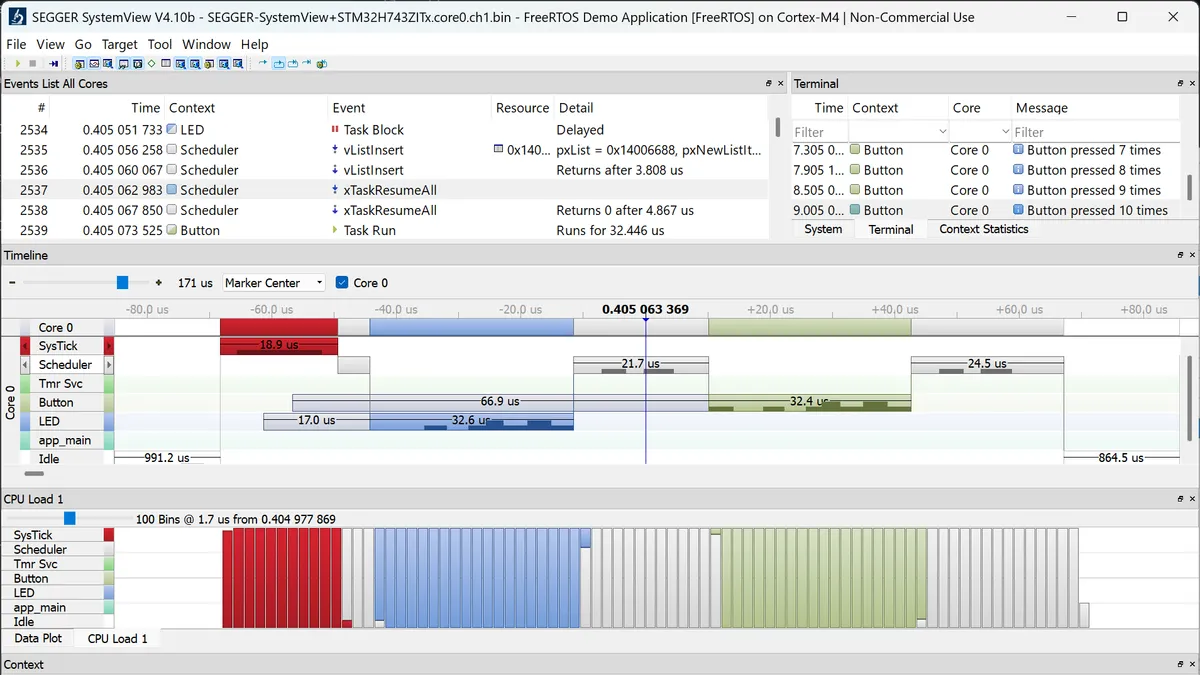
SEGGER SystemView as a CMSIS software pack. SystemView records and visualises tasks, interrupts, software timers and application events with detailed timing. Arm’s SEGGER-SystemView example adds it to a FreeRTOS project on a NUCLEO-H743ZI2 by enabling two software components, which is the recording shown at the top of this article.
RTT inside pyOCD. The CMSIS-Toolbox pyOCD documentation describes an rtt: node that configures RTT channels per processor. Each channel can go to standard I/O, a TCP server, a file, an .SVDat SystemView recording, or a live stream to the SystemView Application. Arm’s SDS-Framework also provides an RTT-based I/O layer for recording and playing back data streams.
Why this matters on a real bench
printf without a UART
A UART for debug output costs pins, a connector and an adapter, and on production hardware it is often not exposed at all. RTT runs over the SWD or JTAG connection you already have. Arm’s example offers two target sets: console, which connects RTT channel 0 to an interactive console, and file-io, which redirects standard I/O to files.
Multi-core output in one run
The RTT example includes a multi-core project on an Infineon KIT_T2G-B-H_LITE. With the file-io target set, pyOCD writes one output file per core: Cortex-M0+, Cortex-M7 core 0 and Cortex-M7 core 1.
Hardware-in-the-loop tests in CI
Because RTT output can go to files, a test runner can program the board, run it for a fixed time and check the output with no terminal attached. Arm’s example ships GitHub workflows that build the Infineon application on a hosted runner, then program and run it with pyOCD on a self-hosted Linux runner connected to the board, and verify the output from all three cores.
RTOS timing you can see
A SystemView capture shows when each task ran, for how long, and what pre-empted it. In the CMSIS flow, pyOCD writes the RTT channel to an .SVDat file that the SystemView Application opens afterwards. If you prefer to watch live, switch the target set from systemview-file to systemview-server and pyOCD streams to SystemView over the network. Our SystemView RTOS profiling guide covers how to read the timeline once you have it.
Adding SystemView to a CMSIS project
Arm’s example lists the steps:
- In the Software Components view, enable SEGGER RTT and SEGGER SystemView (FreeRTOS variant). Use SEGGER::RTT 8.58.0 or later, SEGGER::SystemView 4.12.0 or later, ARM::CMSIS-Compiler 2.3.0 or later and ARM::CMSIS-FreeRTOS 11.0.1 or later.
- Add
#include "SEGGER_SYSVIEW_FreeRTOS.h"at the end ofFreeRTOSConfig.h, calltraceSTART();before the RTOS starts, and send your own markers withSEGGER_SYSVIEW_PrintfHost(). - Under the
debugger:node incsolution.yml, route RTT channel 1 to SystemView:
rtt:
  - channel:
      - number: 1
mode: systemview- Build, load and run with the systemview-file target set, stop the session, then open the
.SVDatfile from theoutfolder in the SEGGER SystemView Application.
Related: CMSIS Developer Assistant for AI coding agents
Separately, Arm’s CMSIS Developer Assistant extension gives an AI coding agent controlled access to the CMSIS build system, debugger, target registers, project documentation and connected hardware. It provides MCP tools to build and flash, control the debugger, inspect the target and use serial ports, plus a searchable knowledge base of CMSIS and Zephyr topics. Its documentation states it has been tested with Codex, Claude Code, GitHub Copilot and Kimi Code.
Three things to check before you rely on it
- Know which path you are on. The CMSIS-Toolbox documentation notes that RTT is currently enabled only with the pyOCD
runcommand, and will be added to pyOCD’s gdbserver in a future version. J-Link debugging in the CMSIS Debugger uses SEGGER’s J-Link GDB server, a separate path. For J-Link’s own RTT tooling, see our SEGGER RTT debugging guide. - Know where the RTT control block is. pyOCD looks for the
_SEGGER_RTTsymbol in the ELF file unless you give it an address, a memory range to scan, or enable auto-detect. If it cannot find the control block, RTT is disabled for that core. - Install the SystemView Application. The SystemView pack provides the target instrumentation only. You still need the separately installed SEGGER SystemView Application to view and analyse a recording.
Keil Studio, J-Link and SystemView support in India
GSAS Micro Systems is an authorized engineering partner for both Arm and SEGGER in India. That covers both ends of this integration: Arm Keil MDK and the ULINKplus CMSIS-DAP probe on the Arm side, and the J-Link PRO, J-Link PLUS and SystemView on the SEGGER side.
Our field application engineers help teams choose between a CMSIS-DAP probe and a J-Link for a given project, place the RTT control block where the host will find it, and get SystemView recordings working on the team’s own boards. That work happens with teams in Bengaluru, Hyderabad, Chennai, Pune, Mumbai and Delhi NCR. If you want to try the CMSIS and SEGGER workflow on your own hardware, ask an engineer or request a quote. For a broader introduction to the IDE, see our Keil Studio for VS Code guide.
Feature image: SEGGER SystemView screenshot from Arm’s SEGGER-SystemView example (Apache-2.0), cropped.
Sources:
Also appears in:
Interested in Arm tools?
Talk to our application engineers for personalized tool recommendations.
More from Arm
View all →
Choosing Debug and Trace Tools for Indian Automotive Tier-1s
13 Nov · 11 min
Multicore Debug on AURIX, RH850 and Cortex-R52 in India
13 Nov · 11 min
Non-Intrusive Debug of Safety ECUs on Production Silicon
13 Nov · 10 min
Off-Chip Trace Explained: ETM, Serial Trace, Trace Buffers
13 Nov · 10 min
Emulation vs FPGA Prototyping vs Simulation for SoC Teams
13 Nov · 8 min
GW Instek LCR-7000 and GPM-8340: New in India for 2026
13 Nov · 6 min