In short
SOME/IP "service not available" means the client never received a valid OfferService for that service instance, usually because service discovery multicast is not reaching it, the configured unicast address is wrong, or the routing manager treats the service as internal. In vsomeip the unicast value decides which interface the SD multicast leaves by and which interface joins the group, on Linux the stack will not start external routing until it sees a route covering the configured SD multicast address, and a service whose configuration supplies neither a reliable nor an unreliable port gets no server endpoint at all and is logged as internal.
A SOME/IP client prints Service [1234.5678] is NOT available. and the search that follows lands on a pile of issue threads on the COVESA vsomeip tracker that all look like yours. Each solves one instance and stops. Nothing tells you which of the possible causes you are in.
The message itself carries almost no information. In the vsomeip examples that line is printed by the application’s own availability handler, in request-sample.cpp and subscribe-sample.cpp, not by the stack. All the library said is that it does not currently hold a valid offer for that service instance. The rest is your inference.
This article gives the split the threads never state, with a test for each branch. If the SOME/IP flow itself is unfamiliar, read our SOME/IP explainer first, and our complete guide to automotive Ethernet for the layer below. Every option name below is checked against the vsomeip repository, every protocol claim against the AUTOSAR SOME/IP-SD specification, and every issue outcome against the thread itself.
What “service not available” actually means
The client never got a valid OfferService, and that is the whole claim
The AUTOSAR SOME/IP-SD specification makes availability a consequence of one entry type. An Offer Service entry sets Type 0x01, the service and instance identifiers, both version numbers, and a TTL the specification defines as the lifetime of the service instance, after which “the service instance shall considered not been offered”. TTL 0xFFFFFF means valid until the next reboot, TTL 0x000000 is a Stop Offer, and where a CYCLIC_OFFER_DELAY is defined the TTL has to be greater than or equal to it.
Two matching rules from the same specification account for a fair number of silent failures. On the initial Offer Service entry, Service ID, Instance ID, Major Version and Minor Version must match the configured values exactly, unless the configuration holds the any-values 0xFFFF for Instance ID and 0xFFFFFFFF for Minor Version. On subsequent Offer or Stop Offer entries, Service ID, Instance ID and Major Version must match the initial offer. A major version bumped on one side produces offers the other side is required to ignore.
The three stages, and which message belongs to which
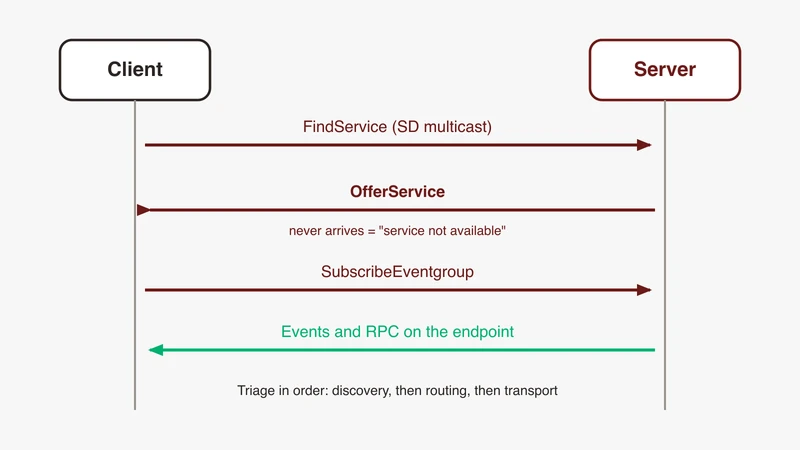
Find Service entries are sent only when the state of a service is unknown, and stop as soon as the corresponding offers arrive. Subscribe Eventgroup entries are triggered by offers. So the flow is FindService, OfferService, SubscribeEventgroup, and the error text tells you where you stopped:
- “Service is NOT available” means stage two never completed for this client. Discovery.
- “Routing info for remote service could not be found” means an offer was accepted and the endpoint could not be built. Routing.
- “Lost connection to remote service” means both earlier stages passed. Transport. It is logged as
service_endpoint_disconnected: lost connection to remote serviceon 3.1.x, and asLost connection to remote service:on current versions.
The availability handler fires with false first
One detail is worth internalising before you debug anything. On the long thread about the routing-info error, a participant traced a two-host failure to the wiki example client itself: on_availability is invoked twice, first with _is_available == false and then with true, the example notified its waiting thread without checking the flag, and the request went out before the service was there. Another engineer on the same thread confirmed that adding the check fixed their case, and the behaviour does not show up when both ends are on one machine.
Upstream now ships a wait-until-available example that resolves only when _is_available is true and the instance is concrete, with a default timeout of 10 seconds. If your own client does not make that distinction, fix the client before you touch the network.
Triage: discovery, routing, or transport
Three questions, in order. Do not skip one because the answer looks obvious.
Question 1: are SD messages leaving the offering host at all? Capture on the offering host, on UDP port 30490, which the specification lists as the default for SD_PORT and which vsomeip ships as the port default under service-discovery. No frames means the offering side never entered its main phase, or has no external endpoint to advertise.
Question 2: are they arriving at the client host? Capture on the client’s own interface. Frames on the sender and none on the receiver is a network answer, not a configuration one.
Question 3: does the client accept them and fail to reach the endpoint? Availability true, followed by a routing or connection error, puts you past discovery entirely.
| Symptom | Stage | First thing to check |
|---|---|---|
| No SD frames on the offering host | Discovery | Port configuration missing ... Service is internal in the log; the SD multicast route on Linux |
| SD frames on the sender, none on the client | Discovery | Capture point, interface binding, multicast delivery across the switch |
| SD frames on the client, still not available | Discovery | Service, instance and major version match; unicast value; TTL against cyclic_offer_delay |
Available, then Routing info ... could not be found | Routing | Reliability of the request against the port configured on the service |
Available, then Lost connection to remote service | Transport | The TCP or UDP endpoint itself, not the SD exchange |
| Offers seen, subscription nacked or silently dead | Routing | netmask, and whether the client opened TCP before subscribing |
Works on one host, fails across two
This is the pattern that recurs most across the upstream threads. One filed in 2022 is typical: the reporter ran the stock notify-sample and subscribe-sample, said it worked on one system and failed across two, and posted both logs. A maintainer asked for the configuration files, never got them, and the issue closed with no cause stated. That is the state of the record, and it is why the split below is worth having.
The unicast address is an interface selector, not a label
unicast is documented as the IP address of the host system. In the source it does more. The UDP server endpoint sets the multicast outbound interface option from the local address and joins the group with join_group(<group>, <local v4 address>), so the configured unicast decides which interface the SD multicast leaves by and which joins the group. On a multi-NIC host, a stale or placeholder unicast gives you a stack that runs, logs cleanly and talks to the wrong network. To pin the interface, device is documented as: if specified, IP endpoints will be bound to this device.
The multicast route on Linux, and what the netlink gate actually checks
The vsomeip documentation folder carries a short page headed Multicast. It says that to use IP multicast the route must be added, gives the current Linux form as ip route add 224.0.0.0/4 dev eth0, and notes that other operating systems may have different ways to do this. That is the whole prescription. The maintainer’s 2019 reply on the routing-info thread used the older net-tools spelling, route add -net 224.0.0.0/4 dev YOUR-DEVICE, which does the same thing where net-tools is installed. Another participant there suggested narrowing it to the configured group with a /32 route. Nothing upstream promises more.
The source explains why it matters. On Linux the routing manager builds a netlink connector from the configured unicast and SD multicast addresses, watches route add and delete messages, and calls check_sd_multicast_route_match, which masks the route destination with the route’s own prefix length and compares it against the configured group, and only accepts the route when it sits on the interface that carries the configured unicast address, which is the second place in the source where unicast decides an interface. Because the mask uses the route’s own prefix length, a default route, whose prefix length is zero, matches any group, which is why the upstream logs show SOME/IP routing ready. immediately after the default-route line and before the 224.x line. is_external_routing_ready() returns true only when the interface is up and, with service discovery enabled, that route has been seen. The netlink branch is compiled under __linux__; other platforms call start_ip_routing() directly. So on Linux, no route on that interface covering the group means no service discovery, no offers, and a log that stops before SOME/IP routing ready.
The log tells you when the gate opened, at warning level: Route "224.224.224.245/32 if: eth0 gw: n/a" state changed: up. On the 2018 thread about two hosts that could not communicate, the route tables the reporter posted carry different groups, 224.224.224.245 on one host and 244.244.244.245 on the other, and they noted the group was quiet. Nobody there named that as the cause. Given the match logic above, it is the first thing to check on your own bench: the route has to cover the group your configuration names.
Netmask, and the subscription the offering side nacks
netmask is documented as the netmask to specify the subnet of the host system, which reads like a formality. It is load bearing. When the offering side processes an eventgroup entry, check_ipv4_address masks the subscriber’s address and the host’s own unicast with the configured netmask and refuses the subscription when they differ, logging “Subscriber’s IP isn’t in the same subnet as host’s IP”. It also refuses a subscriber whose address equals the host’s own. When the check fails the offering side inserts a subscription ack with TTL 0, which is a SubscribeEventgroupNack, so the refusal is on the wire as a type 0x07 entry with TTL zero even though the client library reports nothing useful. Filter for someipsd.entry.type == 0x07 && someipsd.entry.ttl == 0.
Firewall, interface and the path in between
Once the two configuration files agree, what is left is delivery. On the 2018 thread about two devices that would not communicate, an engineer who joined the thread reported that on two Android targets the client target was not receiving the multicast the service target was sending, and that it worked once the client was connected over the LAN, using basic client and service JSON files with no complex features and without the --tcp flag suggested earlier. Two things changed at once there, the connectivity and the configuration, so read it as a pointer at the delivery path rather than as proof. Reverse path filtering, a host firewall and multicast handling on the switch all live in this branch. If the link is new, rule the physical layer out first.
Routing manager traps
Who is the routing manager
The routing key names the application that hosts the routing component, either as a string or as a structure with host and guests properties. The configuration documentation gives the rule for the under-specified case: if the routing is not specified, the first started application will host the routing component. On a bench where both processes are started by hand, that makes start order part of your configuration whether you meant it to be or not. Two hosts each hosting their own routing manager is the ordinary two-node case and is not the problem; only two routing managers on one host need the network key.
The service the routing manager decides is internal
The configuration reference documents an internal_services array, but that is a different mechanism, a range of service IDs for which vsomeip suppresses FindService messages. The behaviour here, a service silently becoming internal because no port was configured for it, is documented only by the log line it produces. In routing_manager_impl, init_service_info creates server endpoints for local services only. It reads a reliable port and an unreliable port from the configuration, creates an endpoint for each that is set, and when both come back as ILLEGAL_PORT it logs Port configuration missing for [1234.115c]. Service is internal. No external endpoint exists, so nothing is offered on the wire and the remote client sees nothing while both processes look healthy.
The upstream issue with that exact title shows the shape of the mistake. The reporter had a port configured, "unreliable" : "59090", and still got the message. The single maintainer reply was one line: change "x1234" to "0x1234" and "x115c" to "0x115c". The mechanism is that the configured entry then never matches the service being offered, so the port lookup returns ILLEGAL_PORT for both transports. That reply is the only one on the thread, and the issue was closed a few months later with no confirmation from the reporter.
More than one routing manager on one machine
The network key is documented as a network identifier used to support multiple routing managers on one host, changing the name of the UNIX domain sockets in /tmp/ from the default vsomeip prefix, so the sockets become /tmp/<network>-$CLIENTID. On the upstream issue about this, two participants reported that the shared-memory segment the older documentation also described could not be found in the 3.1.20.3 code, and the current documentation no longer mentions it. The reporter’s actual problem, that two applications each hosting their own routing manager on one host could not see each other’s local services, was never resolved: a maintainer asked in 2023 whether it still occurred, got no reply, and the issue was closed. Prove this configuration on your own hardware rather than assuming it.
Startup order, and how long to wait
The specification gives the provider three phases: an Initial Wait Phase with a random delay between INITIAL_DELAY_MIN and INITIAL_DELAY_MAX, a Repetition Phase whose delay doubles after each message and sends at most REPETITIONS_MAX entries, and a Main Phase in which the provider waits one CYCLIC_OFFER_DELAY before the first offer and repeats at that interval. vsomeip’s defaults are initial_delay_min 0 ms, initial_delay_max 3000 ms, repetitions_base_delay 10, repetitions_max 3, cyclic_offer_delay 1000 ms and ttl 0xFFFFFF. Ten seconds, the default in wait-until-available, is a defensible bench cutoff.
Endpoint traps, reliable versus unreliable
The routing-info error is usually a transport mismatch, not a discovery failure
The longest of these threads runs from 2019 to 2024 under the title [error]Routing info for remote service could not be found! and contains at least four proposed causes: a missing comma in the applications array, the availability-handler bug above, the multicast route, and finally the one that explains the message. Engineers converged on that one from 2023 onward: create the request with the right reliability. runtime_impl::create_request(bool _reliable) sets the flag on the message, set_reliable() overrides it, and the service must be configured with a matching reliable or unreliable port.
The source confirms the mechanism. In vsomeip 3.1.20.3 the routing manager calls find_or_create_remote_client(service, instance, _reliable) for an outgoing request and logs that error when the call returns nothing. Current master reworded it to Routing error. Endpoint for remote service ... could not be found! and first retries with the opposite reliability, logging a warning that it is sending via the available endpoint. If you are on a recent version and see that warning, you have the same mismatch, surviving on a fallback.
The protocol side agrees. Offer Service entries must reference an IPv4 or IPv6 endpoint option to signal how the service is reachable, one per transport protocol needed. An offer carrying only a UDP endpoint option is complete and valid. It just cannot satisfy a reliable request.
One more requirement in this family: the client shall open a TCP connection to the server before sending the Subscribe Eventgroup entry, where the service is offered over TCP and the eventgroup is requested over TCP. “Required TCP-connection was not opened by client” is listed among the reasons a server may send a Subscribe Eventgroup Nack.
Lost connection after a successful discovery
An upstream issue titled service_endpoint_disconnected: lost connection to remote service shows a client repeating that warning at a growing interval between two devices on vsomeip 3.1.20.3. The only reply is a maintainer stating that 3.1 is no longer supported and asking for a retest on 3.8, and the issue closed on that. No root cause was established, so do not read one into it. What the message does establish is stage: discovery worked, the routing manager built an endpoint, and the endpoint went away. Debug the connection, not the SD exchange.
Port collisions between instances
The clients section fixes the local ports used to reach a given service instance. The documentation is precise about the failure mode: vsomeip takes the first free port of the list, and if no free port can be found the connection will fail. It adds that the configured ports must not overlap with ports the IP stack selects automatically. Two instances with overlapping lists is a connection failure that never reaches the wire.
When SD packets do not appear in the capture at all
Three cases look identical in a capture window: the packets were not sent, they were not delivered to your capture point, or they were delivered and not decoded.
Not decoded is a separate problem. Wireshark’s SOME/IP dissector ships bound to no ports and with its heuristics disabled, so a correct capture on a non-default port shows nothing recognisable. Do not debug discovery through that. Work through our Wireshark SOME/IP decode fix list first, then our note on payloads from ARXML once you need field names.
Capture point decides what “not delivered” means. The Wireshark wiki on Ethernet capture setup states that on a switched network, capture attempts will by default see only the traffic the capturing machine would see when not in promiscuous mode, and that you have to take specific action to get anything else onto the adapter. Multicast frames addressed to a group the adapter has joined are delivered; frames the switch never forwarded to your port are not. Capturing on the sender therefore hides a switch that drops the multicast. That is the shape of one upstream issue on a non-Linux target, where a reporter could not capture SD packets between a server and a client on the same target, another engineer added a similar observation from two QEMU instances, and the issue closed with no cause recorded.
One log line is worth more than the capture here. vsomeip starts a timer set to cyclic_offer_delay plus a tenth of it, and on expiry logs Didn't receive a multicast SD message for <n>ms., then leaves and rejoins the SD multicast group. If that repeats, the stack agrees nothing is arriving, and it has already tried the rejoin.
A bring-up checklist for a new node
Run this top to bottom on a fresh setup, before you open a capture.
- Confirm
unicastin each configuration file is the address of the interface you intend to use, on that host, right now. - Confirm
netmaskputs both hosts in the same subnet, and that neither host’s unicast equals the other’s. - On Linux, add the multicast route on both hosts and confirm the log shows the route state change and then
SOME/IP routing ready. - Confirm the
service-discoveryblock is identical on both sides:multicast,port,protocol, and the timing values. - Confirm the offering side’s
servicesblock names the service and instance in the same notation the application offers, with0xprefixes, and carries areliableor anunreliableport. Then confirm the log does not say the service is internal. - Confirm the client requests the same service, instance and major version, and creates requests with the reliability the service offers.
- Confirm exactly one application per host is named in
routing, and note the start order. - Wait ten seconds before calling it a failure, and check the availability handler distinguishes true from false.
- Only now capture, on both hosts, on the SD port.
Record, for the next failure: both configuration files, ip addr and ip route from both hosts, both full logs from process start at logging level debug, the vsomeip version string, and a capture from each end. Those artefacts turn a multi-day hunt into a morning. For the surrounding design, see our note on service-oriented traffic in a vehicle architecture.
Where GSAS fits
GSAS Micro Systems is an engineering partner to teams building service-oriented communication on automotive Ethernet in India. Service discovery is where programmes lose weeks, because the failure is quiet on both sides: two processes run, both logs scroll, and the only evidence is a line printed by your own application.
Our applications engineers in Bengaluru, Pune, Chennai and Hyderabad work this with your team on your hardware. Send the two configuration files, the interface and route state from both hosts, the full logs from process start and a capture from each end, and we work the discovery path with you rather than on a reference setup that already works.
If you are bringing up a new node, or planning the measurement setup for one, start at our automotive Ethernet capability page or talk to an engineer.
References
- AUTOSAR Foundation R24-11, SOME/IP Service Discovery Protocol Specification, document 802: https://www.autosar.org/fileadmin/standards/R24-11/FO/AUTOSAR_FO_PRS_SOMEIPServiceDiscoveryProtocol.pdf
- COVESA vsomeip repository: https://github.com/COVESA/vsomeip
- vsomeip configuration documentation,
documentation/vsomeipConfiguration.md: https://github.com/COVESA/vsomeip/blob/master/documentation/vsomeipConfiguration.md - vsomeip multicast note,
documentation/README.md: https://github.com/COVESA/vsomeip/blob/master/documentation/README.md - vsomeip source,
implementation/routing/src/routing_manager_impl.cpp(init_service_info,is_external_routing_ready,start_ip_routing,on_net_interface_or_route_state_changed) - vsomeip source,
implementation/endpoints/src/netlink_connector.cpp(check_sd_multicast_route_match) - vsomeip source,
implementation/endpoints/src/udp_server_endpoint_impl.cpp(multicast outbound interface andjoin_group) - vsomeip source,
implementation/service_discovery/src/service_discovery_impl.cpp(check_ipv4_address,on_last_msg_received_timer_expired) - vsomeip 3.1.20.3,
implementation/routing/src/routing_manager_impl.cpp(the original routing-info error) - vsomeip examples,
request-sample.cpp,subscribe-sample.cppandwait-until-available/wait-until-available.cpp - vsomeip sample configurations,
config/vsomeip-udp-service.jsonandconfig/vsomeip-udp-client.json - COVESA/vsomeip issue 363, service is NOT available across two systems: https://github.com/COVESA/vsomeip/issues/363
- COVESA/vsomeip issue 44, routing info for remote service could not be found: https://github.com/COVESA/vsomeip/issues/44
- COVESA/vsomeip issue 113, port configuration missing, service is internal: https://github.com/COVESA/vsomeip/issues/113
- COVESA/vsomeip issue 402, lost connection to remote service: https://github.com/COVESA/vsomeip/issues/402
- COVESA/vsomeip issue 1003, service discovery packets not captured: https://github.com/COVESA/vsomeip/issues/1003
- COVESA/vsomeip issue 32, unable to communicate between two hosts: https://github.com/COVESA/vsomeip/issues/32
- COVESA/vsomeip issue 29, communication between two devices: https://github.com/COVESA/vsomeip/issues/29
- COVESA/vsomeip issue 331, multiple routing managers on one machine: https://github.com/COVESA/vsomeip/issues/331
- Wireshark wiki, CaptureSetup/Ethernet: https://wiki.wireshark.org/CaptureSetup/Ethernet
Also appears in:
Building for Automotive & Mobility?
Talk to our application engineers for personalized tool recommendations.