In short
TECMP and ASAM CMP are Ethernet encapsulation formats that wrap captured in-vehicle bus and sensor data with timestamps and interface IDs, so capture modules can stream to a logger and Wireshark can decode it. Wireshark ships a dissector for both: the TECMP dissector has been in stable releases since 3.4.0 and binds to its own EtherType, and the asam-cmp dissector has been in stable releases since 4.2.0, reached either by the TECMP dissector forwarding frames on that shared EtherType or by naming a UDP port under Decode As.
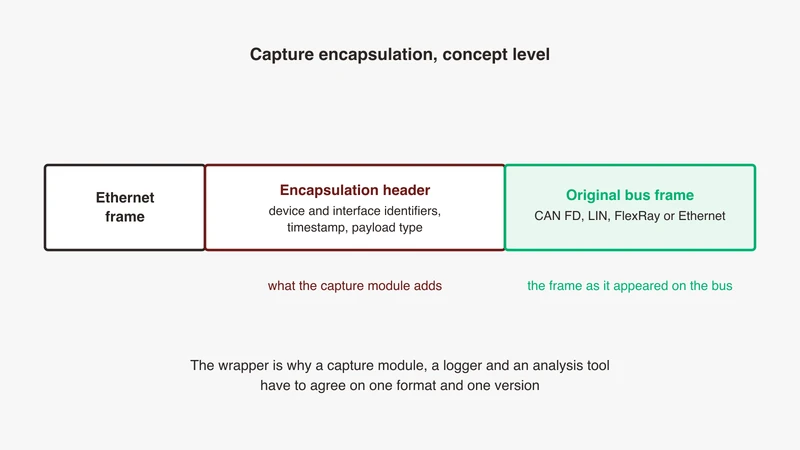
A capture module is bought as a box with ports and used as the first stage of a data format. It wraps every CAN, LIN, FlexRay, analog or Ethernet event it sees into an Ethernet frame with a timestamp on it, and streams those frames to a logger. If the logger, the offline toolchain and Wireshark do not agree on which wrapper and which version, you own an expensive stream of bytes that nothing reads.
Two open formats occupy this space, both with Wireshark dissectors in the tree. One is TECMP, a vendor-originated capture module protocol that became a lab convention. The other is ASAM CMP, the Capture Module Protocol published as a standard by ASAM. What is published about either is a field reference of hundreds of entries or a one-paragraph landing page, neither of which tells a buyer what the wrapper is for or how to prove the decode works. Every claim below traces to the References, and where there is no public source we say so.
What a capture encapsulation format is
The capture-module-to-data-sink model both formats share
ASAM states the model plainly: the standard defines the communication between capture modules, or probes, and data sinks, to monitor in-vehicle bus communication and sensor data, transported over Ethernet. Capturing and recording are usually both the probe’s job, and ASAM notes this is not flexible enough when many probes shall be recorded within one centralised system such as a logger as data sink. Probes capture, a sink records, and the encapsulation is the part of the chain every vendor on your bench implements identically.
Why a raw CAN, LIN or FlexRay frame cannot travel across Ethernet on its own
A CAN frame has no MAC addresses, no EtherType and no length an Ethernet receiver would understand. More to the point, it has no identity beyond its arbitration ID: nothing says which of four CAN channels it arrived on, and nothing says when. That context lives in the receiver, not the frame, and the wrapper preserves it: which bus, which module, what time, in what order.
What the wrapper adds: timestamp, interface identifier, sequence number, data type
Both carry the same four things under different names, each confirmable in the Wireshark display filter reference rather than on a datasheet.
For the vendor-originated format, the reference documents a header carrying Device ID, Counter, Version, Message Type and Data Type, plus Device Flags with sub-fields including Multi Frame, Spy and Device Overflow, and per message an Interface ID, a Timestamp, a Timestamp ns as a 64-bit integer and a Timestamp Synchronisation Status boolean. For ASAM CMP it documents a header with Version, a reserved byte, Device ID, Message Type, Stream ID and Stream Sequence Counter, and a data message header carrying Timestamp, Timestamp (ns), Interface ID, common flags for Synchronized, Overflow, Error in payload and Segmentation, Payload Type and Payload Length.
Both make explicit what a buyer cares about: whether the timestamp was synchronised, and whether the module dropped, the point our capture guide makes about capture paths generally.
Where this sits relative to your capture hardware and your logger
The encapsulation is the interface between three purchases usually made separately: the hardware that emits it, the logger that writes it or something derived from it, and the toolchain that reads what the logger wrote. The lab switch is not part of that contract, since it forwards frames without knowing what they are, and our lab switch guide covers it separately. So the format is a programme-level decision, and a different thing from instrument-level decode at the probe tip, covered in our multi-bus instrument article.
TECMP in one page
Origin: a vendor-originated format that became a lab convention
This one is a vendor-originated capture module protocol: its specification is published by the originating vendor rather than through a standards body, and its version history lives in the vendor’s documentation rather than in a standards register. What it also has is an in-tree Wireshark dissector, which is why it became a convention: a capture from a module emitting it opens in a tool everyone already has. That is not a criticism, it is a statement about where the information below comes from, the dissector source and the field reference.
Structure at concept level: header, interface ID, payload type, payload
The dissector reads the header in a fixed order: Device ID, Counter, Version, Message Type, Data Type, a reserved field, then flags. What follows depends on the message type, and the source enumerates control messages, device and bus status, log stream, configuration, replay data, counter events and time synchronisation events. Data-bearing messages carry the interface identifier, the timestamp fields above, and the captured bytes. The Data Type field is where the breadth lives, with the values listed in the table below, and it carries more than buses, which is why sensor correlation depends on this choice.
What the in-tree Wireshark dissector gives you, and the payload sub-dissection
The dissector registers itself on its own EtherType. No port to configure and no preference to set for the common case, which is why such a capture usually just works.
Payload decoding is delegated. The dissector registers two tables other dissectors can bind into, one keyed on the 32-bit interface identifier and one on the 16-bit data type, and for a data message it looks first for a handle registered against that interface identifier. Where nothing has claimed the payload, RS-232 ASCII goes to the text-lines dissector and everything else to the data dissector, as an undecoded byte sequence. Encapsulated Ethernet goes to the Ethernet dissector directly, which is the pattern our SOME/IP fix list describes one layer up.
Versions, and why the version matters more than the name
The header carries a Version field, and the version determines whether your chain works. The public evidence is the Wireshark merge request that changed how the newer format is detected: it states that version 1.7 specifies the first byte of the Device ID as always 0x00, while older versions allowed 0xff there for user-defined Device IDs. A byte of meaning changed between minor versions. So “our module speaks this format” is not an answer. The answer is a version number, in writing, for the firmware you will receive.
ASAM CMP in one page
The standardisation story and what ASAM publishes publicly
ASAM publishes CMP under the title Capture Module Protocol, in its Measurement and Calibration domain, with application areas listed as in-vehicle communication monitoring, data capturing and data transmission. The current version is 1.1.0, released 26 January 2026.
Two things there matter at procurement time. ASAM names the authors as a group including vehicle manufacturers, tool suppliers and engineering companies, so the format was negotiated across the industry rather than published by one party. And the page offers the specification download free of charge to ASAM members, while non-members join or purchase it; the release presentation is viewable online without charge. Either way there is public material to check before you buy hardware that emits it.
Message classes at concept level: data, status, control
The dissector enumerates five message types: Capture Data, Control, Status, Transmit Data and Vendor-defined. The ASAM page corroborates the shape, adding time synchronisation and configuration mechanisms to the same list.
The status message types include Capture Module Status, Interface Status, Configuration Status, Data Lost Status and Time Sync Lost Status. A format carrying “I lost data” and “I lost time sync” as typed messages, rather than leaving you to infer both from a gap, is one you can build an automated file-integrity check on.
The asam-cmp dissector in Wireshark and when it landed
The Wireshark 3.7.0 development release announcement of 25 August 2022 lists ASAM Capture Module Protocol (CMP) under New Protocol Support. In stable releases the field reference records the asam-cmp fields from 4.2.0, and the 4.2.0 release notes list the protocol as new, so treat 4.2.0 as the floor in your lab standard. The dissector claims no default transport: its handoff registers the handle for Decode As on the ethertype table and, with a preference, on udp.port. There is no default port, which is a common reason such a capture shows nothing on a fresh install.
What “standardised” buys you at procurement time
Three things. A specification your team can read without signing anything with a supplier. A version number that means the same to two vendors, because a third party controls it. And a named author list, which makes “we support ASAM CMP” a checkable claim in a tender. It does not buy interoperability between two products at the version you will run, which stays a written question.
TECMP versus ASAM CMP: what actually differs
Comparison table
Every cell traces to a source in the References, and a cell with no public source states the question to ask.
| Dimension | TECMP | ASAM CMP | How we know |
|---|---|---|---|
| Origin and governance | Vendor-published documentation; governance sits with the vendor, so ask which specification version the firmware emits | Published by ASAM, version 1.1.0 of 26 January 2026, multi-party author list, free to members | Dissector source; ASAM page |
| Wireshark transport | Own EtherType, decodes unconfigured | Decode As on ethertype and on udp.port with a preference, no default port | Dissector sources |
| Timestamp model | Timestamp, Timestamp ns, Synchronisation Status | Timestamp, Timestamp (ns), flags for Synchronized, Timestamp recalculated, Overflow, Error in payload | Filter reference |
| Payload breadth | CAN, CAN FD, LIN, FlexRay, GPIO, RS-232, analog, Ethernet, 10BASE-T1S, XCP, MIPI CSI-2, SPI, I2C | Overlapping, not a superset: adds digital signals, GigE Vision, A2B, link state and vendor-specific; carries no XCP | Sources; ASAM page |
| In Wireshark stable since | 3.4.0 | 4.2.0, after a 3.7.0 development listing | Release notes |
| Filter-name stability | Renamed at 4.0.0: Capture Module ID to Device ID, Channel ID to Interface ID | No header-field rename; one spelling correction, frameing_err to framing_err, at 4.4.0 | Filter reference |
The backward-compatibility detail the dissector relies on to tell them apart
The two share an EtherType, so something has to decide which format a frame is. The merge request titled “TECMP: Make ASAM CMP detection backward compatible (Bugfix)”, merged on 29 November 2023, states the rule and its exception: version 1.7 of the older format specifies the first byte of the Device ID as always 0x00, so the newer format is detected on that byte, but older versions allowed 0xff there for user-defined Device IDs, and since those traces still exist, detection was updated to allow 0xff for the older format too.
The source implements that, gated by two preferences on the older protocol, “Detect ASAM CMP” and “Ignore Device IDs 0xff00-0xffff for ASAM CMP Detection”. Forwarding also requires that the asam-cmp handle exists in your build, so on an older Wireshark the frame decodes as the wrong format, and a filled-in tree of wrong values is worse than an empty one.
Migration: what breaks in your filters, scripts and dashboards
Not the capture. The saved work. Field names differ completely between the two dissectors, so every filter, tshark -Y expression and dashboard query is rewritten rather than adapted. The names moved inside the older dissector too: the reference records Capture Module ID for 3.4.0 to 3.6.24 and Device ID from 4.0.0, and Channel ID ending where Interface ID begins. A filter written on a 3.6 bench matches nothing on a 4.x bench and does not error in a way anyone notices, so put the Wireshark version in the lab standard.
Running both on one bench, and why that is a bad default
It is possible, and the detection logic exists so a mixed trace can be read. It is still a poor default: the value of encapsulated capture is one time base across every bus, two formats mean two timestamp models, and detection depends on a preference and a byte value a firmware update can change. Where a bench has both mid-migration, treat it as a temporary state with an end date.
Making Wireshark decode it
Step 1: confirm the dissector is present in your version and enabled
Check the version under Help then About Wireshark. The floors from the release notes are 3.4.0 for the older format and 4.2.0 for the standardised one, and nothing works around being below. Then open Analyze, Enabled Protocols and search for tecmp and asam-cmp: a protocol disabled in an inherited profile behaves like one that does not exist.
Step 2: check the transport the modules emit on
The two are not symmetrical, and this is where most decode failures start. Frames of the vendor-originated format arrive on their own EtherType, which the dissector is registered against, so they decode with no configuration. ASAM CMP frames may arrive on that same EtherType, where detection forwards them, or over UDP, where no default port is registered and nothing happens until you supply one from the module’s configuration.
Step 3: use Decode As when detection does not fire
Follow the pattern in our SOME/IP fix list, which covers the Decode As dialog in detail, including the difference between OK and Save. For a UDP-carried capture, right-click a frame, choose Decode As, set the field to UDP port, the value to your port and Current to ASAM CMP, then save. The durable equivalent lives in the protocol preferences, since the dissector registers on udp.port with one, and the handle is also registered for Decode As on the ethertype table. If frames decode as the wrong one of the two formats, do not reach for Decode As at all: check the two detection preferences under Edit, Preferences, Protocols, under TECMP rather than ASAM CMP.
Step 4: verify the inner bus payload dissects, not just the wrapper
A wrapper that decodes proves the transport and nothing about the payload. Expand a data message: inner content shown as a Data byte sequence means no dissector has claimed that interface identifier or data type, the delegation behaviour described earlier rather than a fault. If the payload is encapsulated Ethernet, expect the Ethernet dissector to have run, then treat SOME/IP inside it as a separate job, where our SOME/IP fix list is the path and our ARXML article turns bytes into signal names.
Step 5: filters and profiles worth saving for the team
Build these against the display filter reference for your version, and keep them in a named profile held in version control. A timestamp-trust filter on tecmp.payload.timestamp_synch_status or asam-cmp.msg_hdr.sync, so any measurement quoted as a number can be checked against whether the capture claimed synchronisation. An overflow filter on tecmp.dev_flags.device_overflow or asam-cmp.msg_hdr.overflow. A continuity column, tecmp.counter or asam-cmp.hdr.stream_seq_cnt, so a gap is seen rather than deduced. A per-bus filter on tecmp.payload.interface_id or asam-cmp.msg_hdr.interface_id.
What a decode failure usually means: version mismatch, not a Wireshark bug
Work the causes in order. Wireshark older than the floor for that format, where the newer format is silently decoded as the older one. A UDP capture with no port configured. A detection preference turned off, or the user-defined-range exception biting on an older trace. A protocol disabled in an inherited profile. A filter written against field names from another Wireshark generation. Only after those five is a genuine format problem likely.
What this means for your hardware shortlist
Ask which format the modules emit, and which version
Both halves matter and the second gets skipped. A format name without a version is not an answer: a byte of meaning changed between minor versions of one of these formats.
Ask what the logger writes and what your offline tools read
The logger may write the encapsulated stream as received, or convert it. Those are different products to live with, and only one lets you open the recording in Wireshark. Ask for the file format by name and confirm your scripts read it before the hardware ships.
Timestamp source and the accuracy claim behind it
Every timestamp is only as good as the clock behind it, and both formats carry a field saying whether synchronisation held. Ask what the time source is, how it synchronises and what happens to that flag when sync is lost. Where the answer involves gPTP, our gPTP article covers what has to work first, and validating time sync covers proving the accuracy claim.
Multi-bus and sensor correlation depends entirely on this choice
Both formats carry far more than CAN, and one wrapper covering CAN, LIN, FlexRay, analog, SPI, I2C, camera transport and Ethernet in a single stream makes cross-domain correlation a query rather than a project. If sensor and camera data are in scope, check the payload types you need against the module, the logger and your analysis tool.
A five-question supplier checklist
Send these in writing and keep the answers.
- Which format do these modules emit, at which specification version, on the firmware build we will receive?
- What is the transport: a dedicated EtherType, UDP or configurable, and if UDP, which default port?
- Which payload types does this module emit, and which of them does your analysis software decode?
- What is the timestamp source, how is it synchronised, and what does the module set the sync flag to when sync is lost?
- On overload, does the module drop silently, or set the overflow flag and mark the gap in the stream?
If the answer to the first is the standardised format, add one more: which ASAM CMP version does your logger read.
Where GSAS fits
GSAS Micro Systems is an engineering partner, and on capture encapsulation the useful conversation happens before the purchase order, not after the first capture. Which format the programme is standardising on, what your analysis scripts read, and whether the Wireshark version on your benches clears the floor. Three answers resolve most of a shortlist.
Our applications engineers work in IST, so a bench session lands inside your working day, and the teams we work with sit in Bengaluru, Pune, Chennai and Hyderabad. A format and toolchain compatibility review is a working session: we go through your capture path, check the version floors, read your team’s filters, and tell you which of the five supplier questions your quotations have not answered.
Start with the automotive Ethernet capability page, then request a scoped conversation describing your capture path and toolchain. Where the answer is that your current setup already decodes what you need, that is the answer you get.
References
- ASAM CMP standard page, ASAM e.V. (Capture Module Protocol; version 1.1.0, 26 January 2026; capture modules and data sinks; buses and signals; message classes; authors; access terms): https://www.asam.net/standards/detail/cmp/
- Wireshark display filter reference,
asam-cmp(versions 4.2.0 to 4.6.8; header fields): https://www.wireshark.org/docs/dfref/a/asam-cmp.html - Wireshark display filter reference,
tecmp(3.4.0 to 4.6.8; Capture Module ID to 3.6.24, Device ID from 4.0.0): https://www.wireshark.org/docs/dfref/t/tecmp.html - Wireshark display filter reference,
tecmp.payload(Interface ID from 4.0.0, Channel ID to 3.6.24; timestamp fields): https://www.wireshark.org/docs/dfref/t/tecmp.payload.html - Wireshark dissector source,
packet-tecmp.c(header order; enumerations; EtherType registration; dissector tables; preferences): https://gitlab.com/wireshark/wireshark/-/raw/master/epan/dissectors/packet-tecmp.c - Wireshark dissector source,
packet-asam-cmp.c(message enumerations; Decode As registration): https://gitlab.com/wireshark/wireshark/-/raw/master/epan/dissectors/packet-asam-cmp.c - Wireshark merge request 13498, “TECMP: Make ASAM CMP detection backward compatible”, merged 29 November 2023: https://gitlab.com/wireshark/wireshark/-/merge_requests/13498
- Wireshark 3.4.0 release notes (New Protocol Support, TECMP): https://www.wireshark.org/docs/relnotes/wireshark-3.4.0.html
- Wireshark 3.7.0 development release announcement, 25 August 2022 (New Protocol Support, ASAM CMP): https://www.wireshark.org/news/20220825.html
- Wireshark 4.2.0 release notes (New Protocol Support, ASAM CMP): https://www.wireshark.org/docs/relnotes/wireshark-4.2.0.html
Also appears in:
Building for Automotive & Mobility?
Talk to our application engineers for personalized tool recommendations.